What Is a Message Queue?
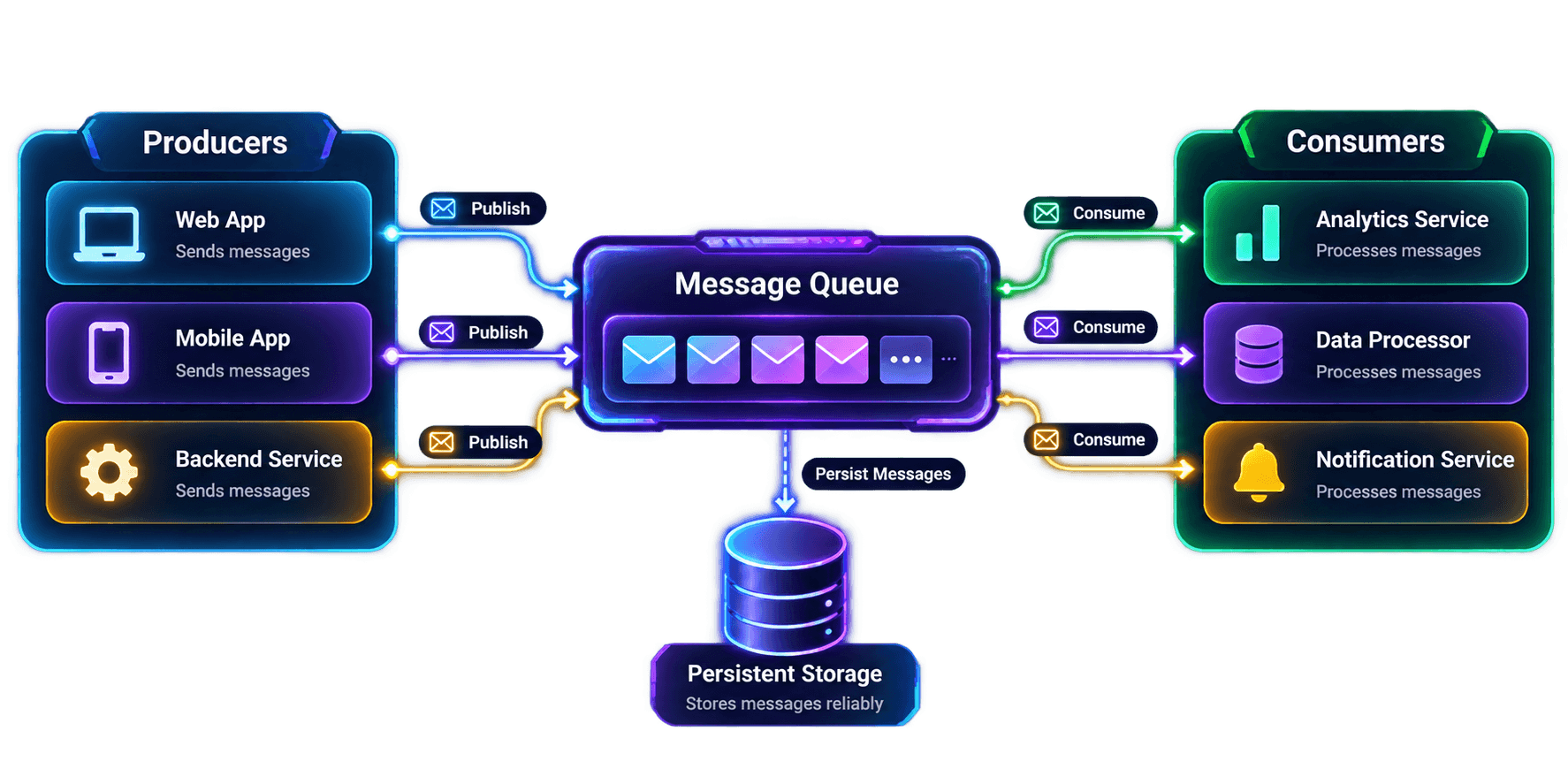
A MESSAGE QUEUE is a system that temporarily stores messages produced by one component until another component is ready to consume and process them.
A producer can send work to a queue without requiring the consumer to process it immediately. This separates the act of sending work from the act of processing it.
Instead of one service calling another and waiting for the operation to finish, the producer places a message in the queue. A consumer retrieves it and processes it asynchronously, according to the queue's delivery behavior.
In simple terms
Core principle
Consider an E-commerce application
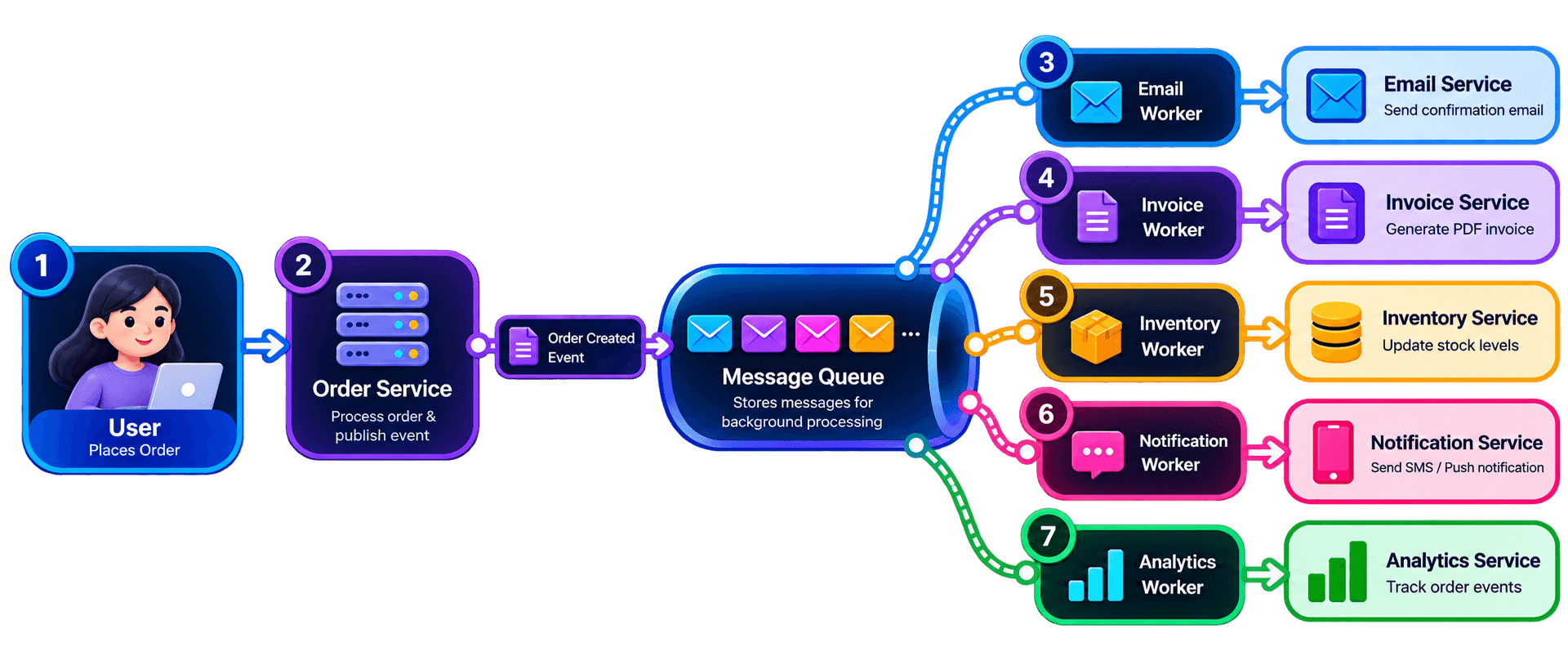
When a user places an order, the system may need to perform several operations:
Work triggered after an order
Send an order confirmation email.
Generate an invoice.
Update inventory.
Send an SMS or push notification.
Update analytics.
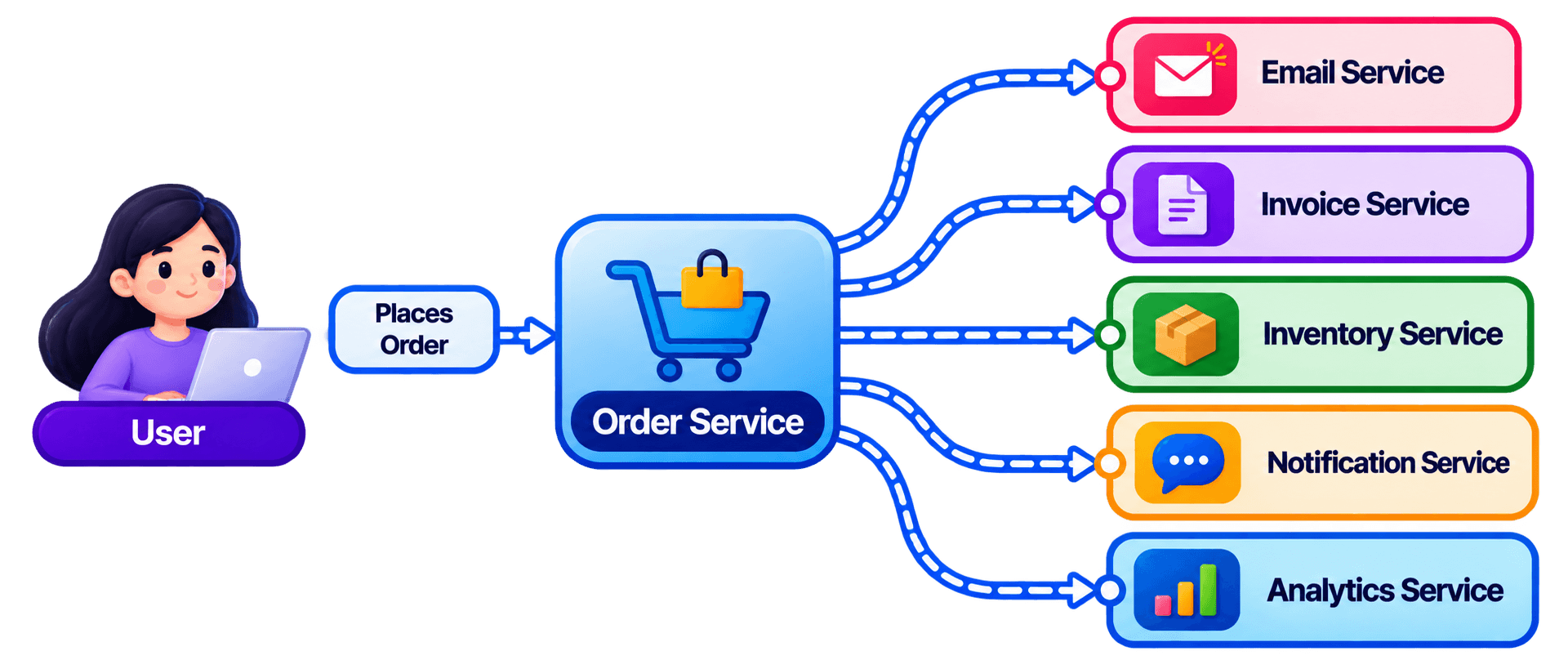
The REQUEST may become SLOWER because the Order Service is waiting for multiple operations to complete.
A message queue separates the main request from work that can happen asynchronously.Problem
With a queue
Basic Message Queue Architecture
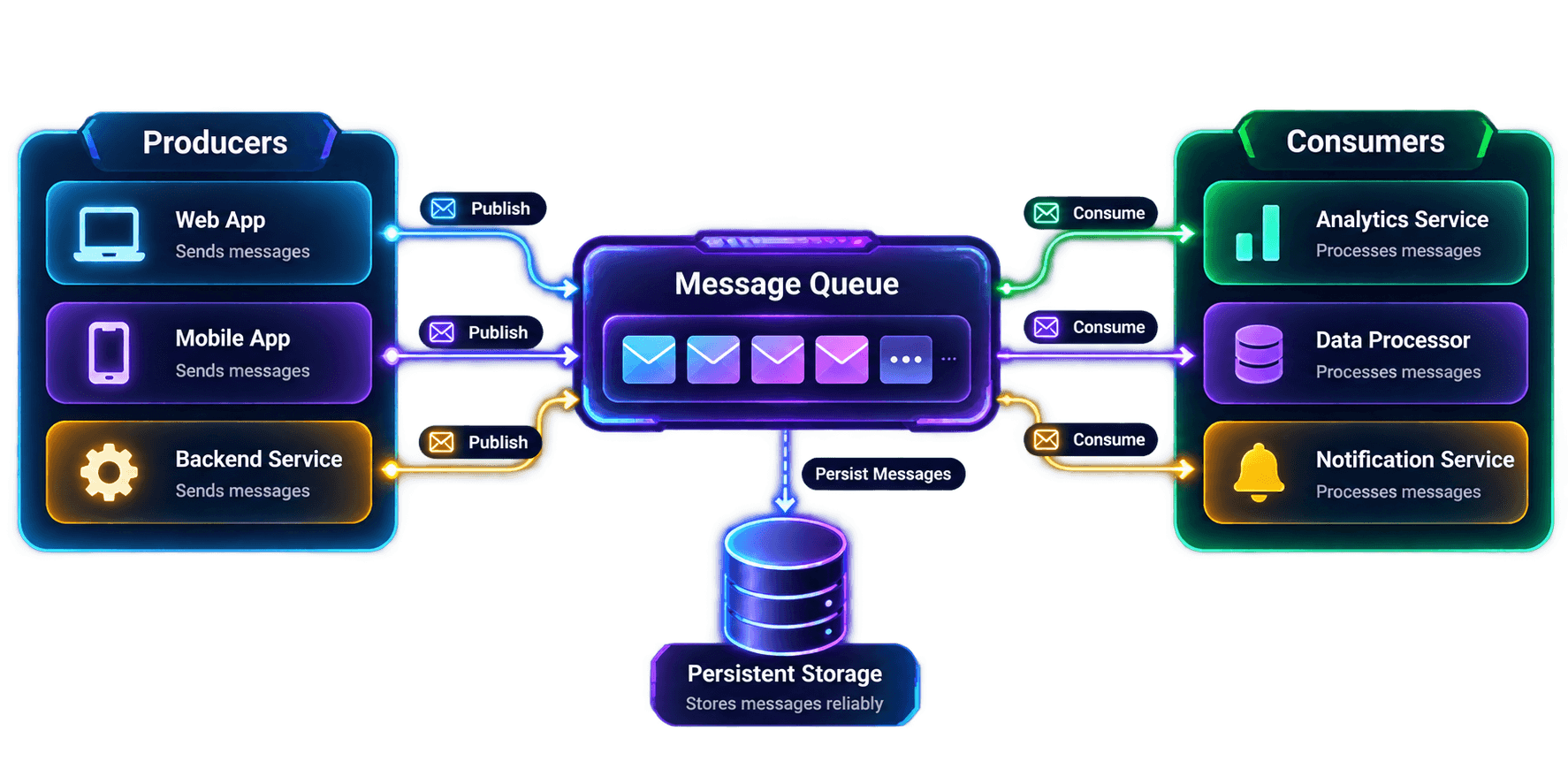
Basic flow:
Creates and publishes a message when an event occurs.
Example
Order Service
Publishes
Order Created
Carries the information that another component needs to process.
Example
Stores messages until consumers retrieve and process them.
Example
Order Created
Payment Received
Reads or receives messages from a queue for handling.
Example
Email Consumer
Receives a notification message.
Performs the actual background operation, often after a consumer receives a message.
Example
Email Worker
Sends the email in the background.
Mental model:
Synchronous vs Asynchronous Processing
Synchronous Processing makes the caller wait for the downstream operation to complete.
Asynchronous Processing allows the caller to submit work and continue while another component processes it independently.
Synchronous Processing
The Order Service calls the Email Service directly and waits for its operation to complete before returning the response.
If the Email Service becomes slow, the Order Service may also respond slowly because the email operation is part of the request's execution path.
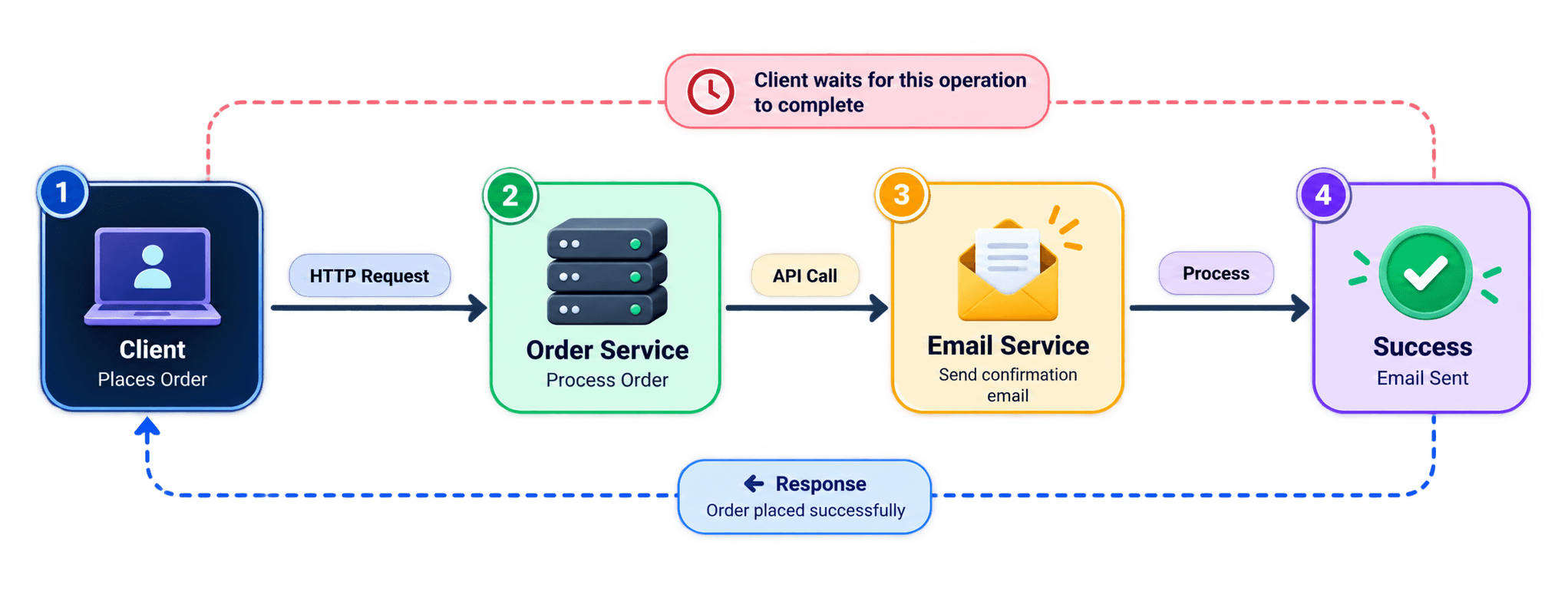
Execution Flow
Asynchronous Processing
The Order Service publishes an email task to a Message Queue. Once the required work and message publication are safely handled, the service can return a response without waiting for the email to be sent.
A worker consumes the queued message and sends the email independently. If email processing is delayed, the original request does not necessarily need to wait.
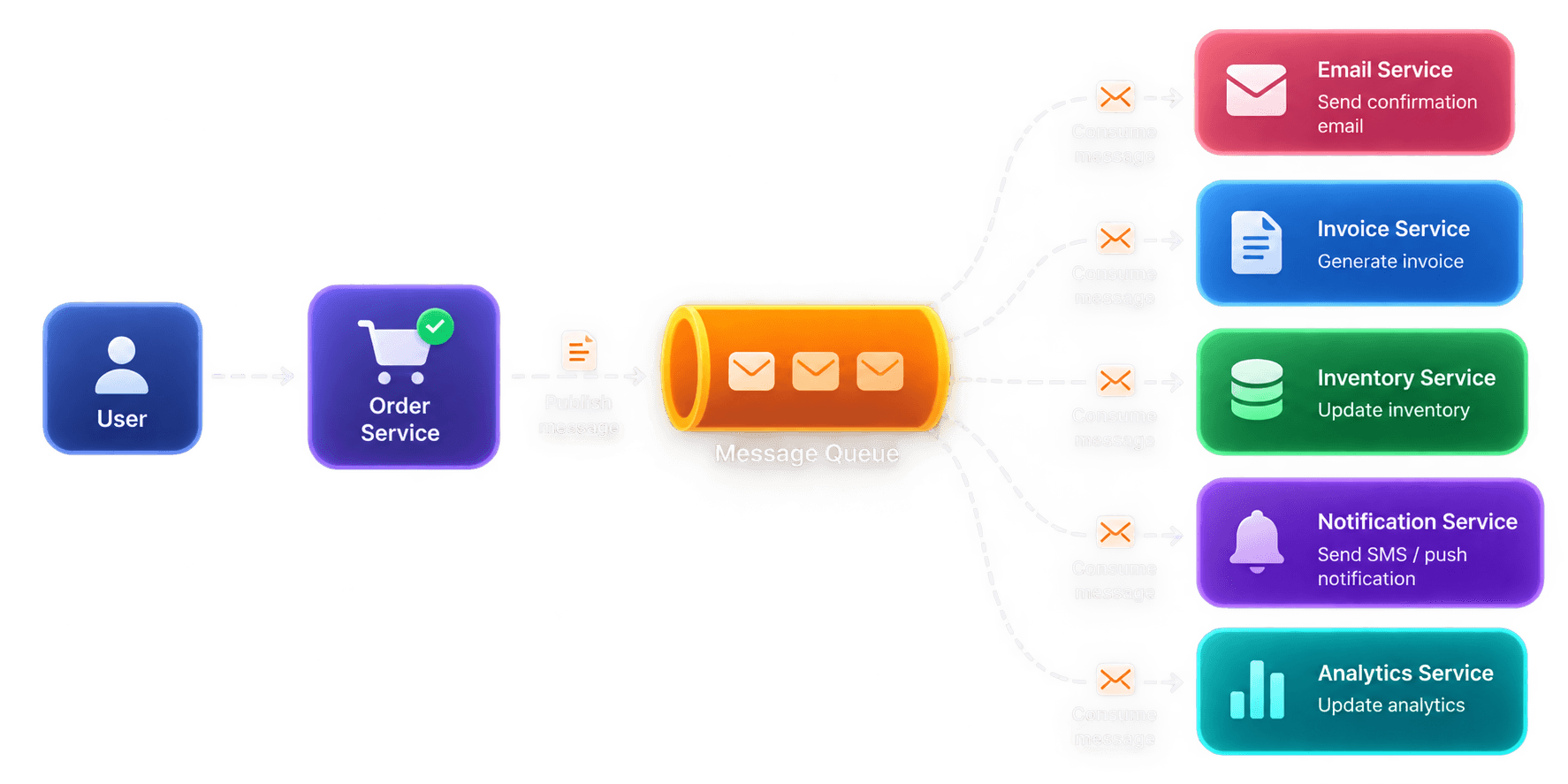
Execution Flow
Background Flow
Both approaches execute work, but they differ in when the caller can continue and how downstream dependencies affect the request.
Factor | Synchronous | Asynchronous |
|---|---|---|
Caller | Waits for the downstream operation to finish. | Can continue after work is accepted. |
Execution | Work runs within the request's execution path. | Background work runs independently. |
Response time | Can increase when downstream services are slow. | Can return earlier without waiting for background completion. |
Coupling | The caller depends on the downstream response. | A queue separates producer and consumer execution. |
Failure handling | Downstream errors or timeouts can affect the request. | Requires delivery, retry and failure-handling policies. |
Typical use | Authentication, validation and operations requiring an immediate result. | Email notifications, background jobs and event processing. |
Synchronous
Asynchronous
E-Commerce Order Example
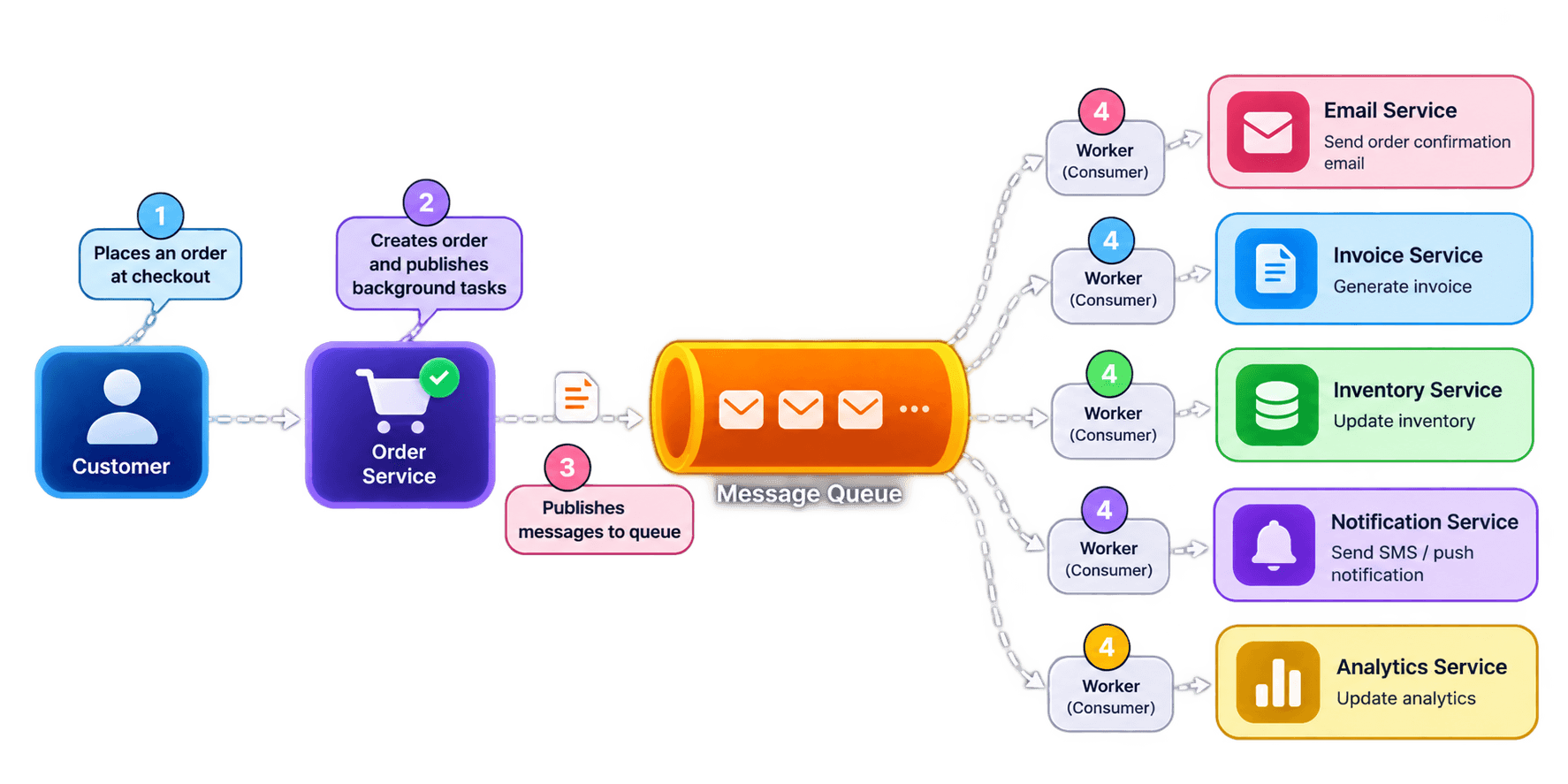
Complete the critical work.
Validate the order and persist it before confirming that the order has been placed.
Publish an event such as
OrderCreated so a worker can send the confirmation email independently.
Handle failures
Configure suitable retries and idempotent processing so temporary failures or duplicate messages do not create unintended effects.
Scaling Message Queue Consumers
A single worker processes messages at its configured rate. If messages arrive faster than it can process them, the queue backlog grows and messages wait longer.
Adding workers can increase throughput when messages can be processed independently and the queue, database, and downstream services can handle the additional load.
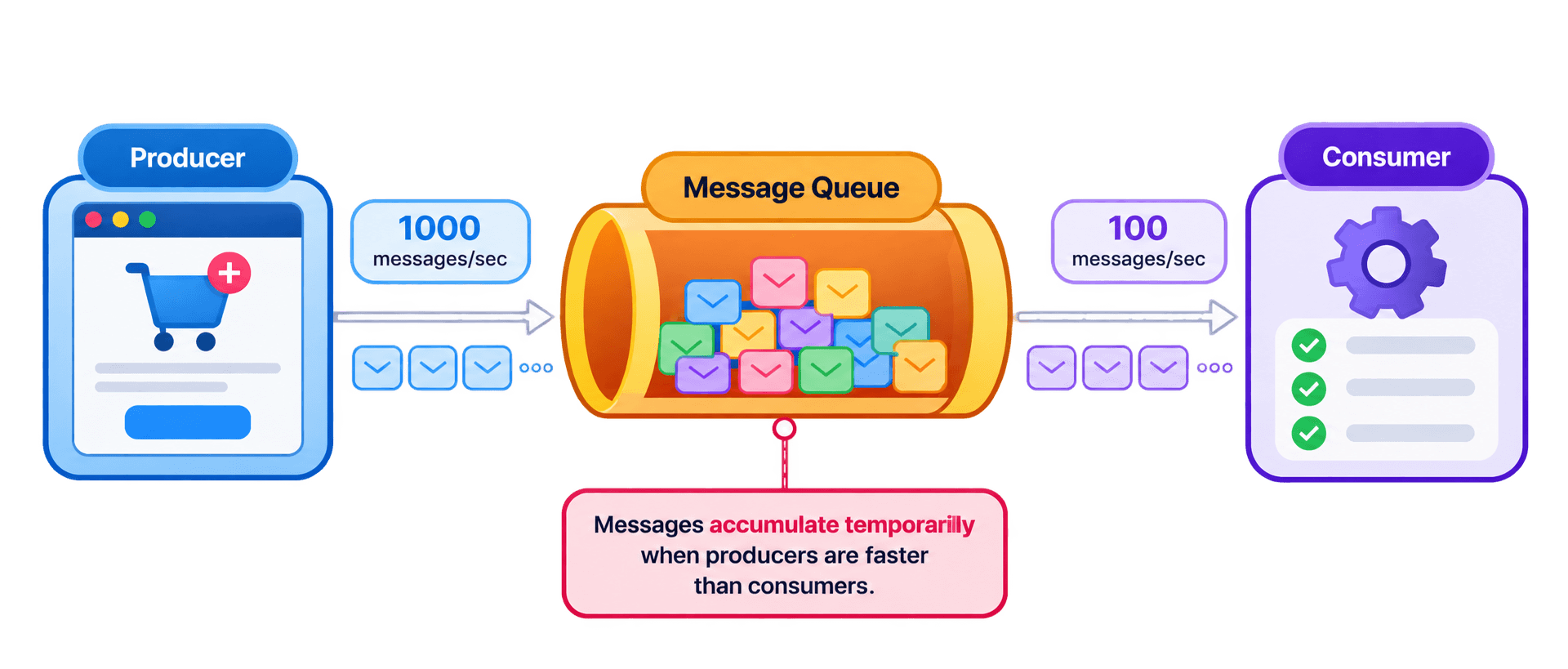
Single consumer
Multiple consumers
What Happens When Traffic Increases?
Backlog grows
Add consumers
Drain the backlog
Calculate Queue Growth
When messages arrive faster
When processing catches up
What Can Limit Consumer Scaling?
The scaling trade-off
What Should You Monitor?
When to consider scaling
Message Queue Reliability
Choose a concept to explore
01 / 06Backpressure
Understand how systems control incoming work when consumers cannot keep up.
PROBLEM:
When Producers Outpace Consumers
⚠️ Imagine an E-commerce application receiving 10,000 Orders/sec , while its MESSAGE CONSUMERS can process only 6,000 Orders/sec.
The remaining 4,000 messages accumulate in the queue every second → If this continues, the backlog grows, processing delays increase, and the system may eventually exhaust available resources.
Without BACKPRESSURE
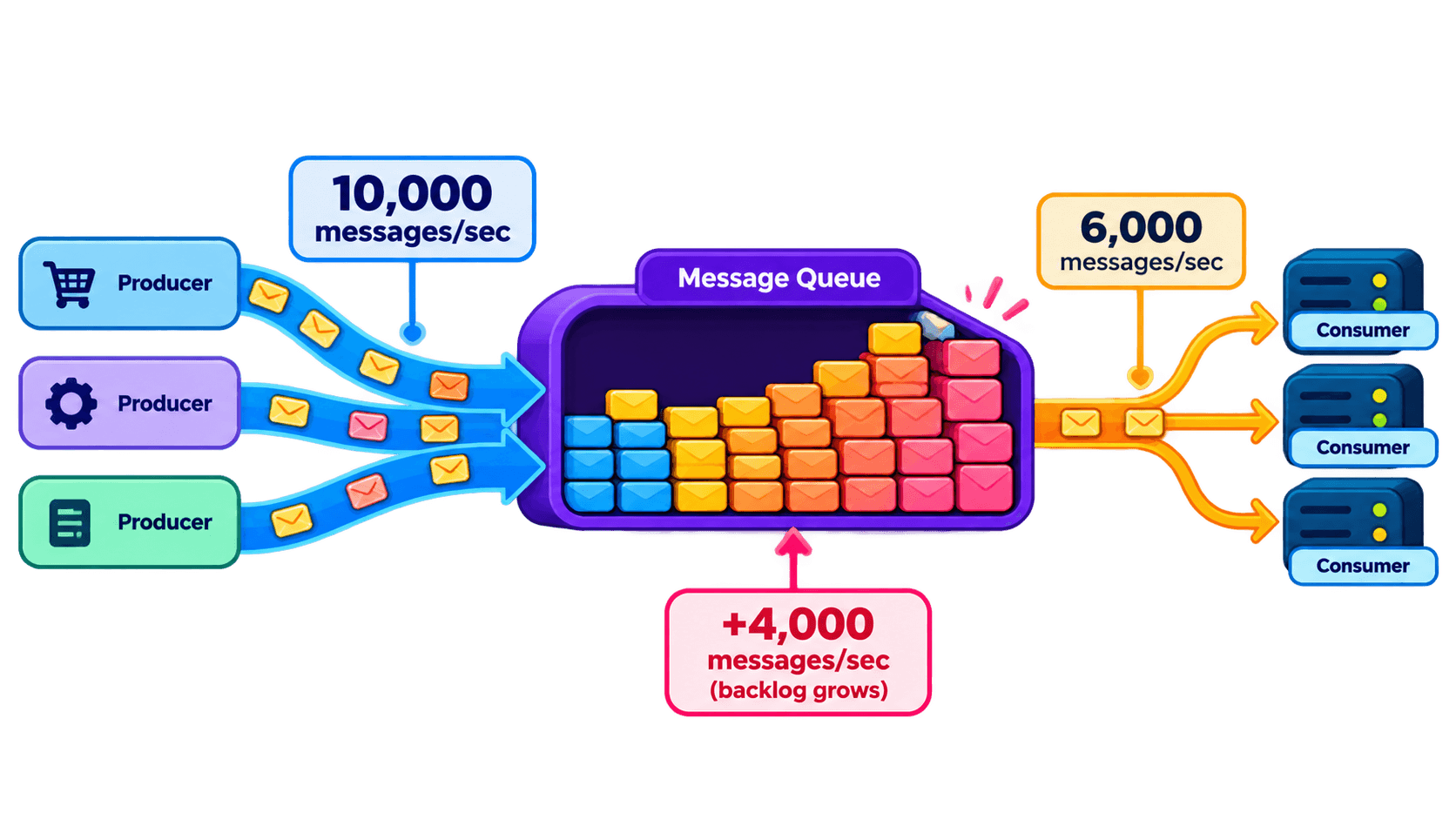
Producers keep publishing
Messages continue arriving at the same rate.
Consumers fall behind
Consumers cannot process incoming messages fast enough.
Queue depth increases
Queue depth and processing latency increase.
Downstream services overload
Downstream services may become overloaded.
The Core Problem
The system accepts work faster than it can safely process it.
SOLUTION
Control the flow of work
Match incoming work to the capacity of the component processing it.
Limit incoming work
Apply rate limits or slow producers when capacity is constrained.
Manage excess traffic
Temporarily reject or defer work that cannot be handled safely.
Scale consumers
Add processing capacity when the bottleneck can be scaled safely.
Recover gradually
Restore traffic as processing capacity becomes available.
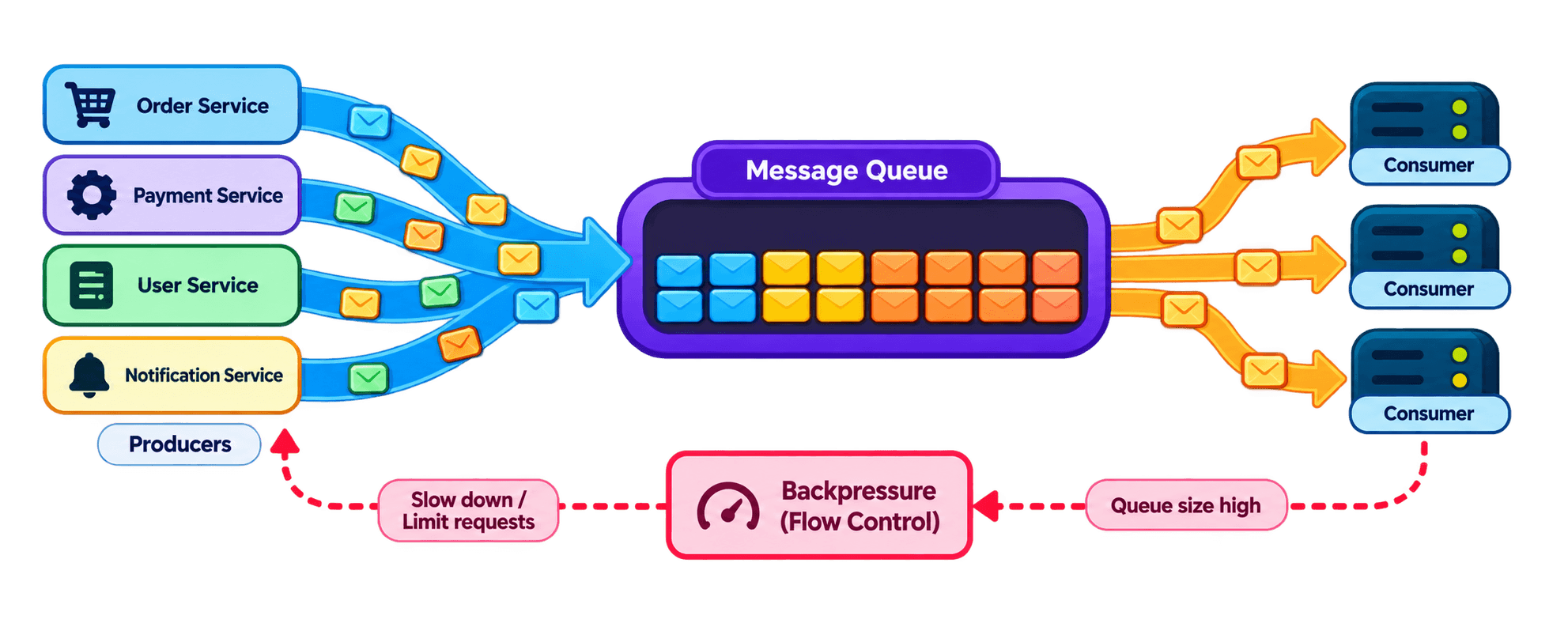
With Backpressure
Incoming work is regulated, consumers get time to catch up, and the risk of unbounded queue growth is reduced.
Concept
What Is Backpressure?
Backpressure is a flow-control mechanism that prevents a component from being overwhelmed when upstream components produce work faster than it can handle.
In a Message QUEUE architecture, it helps regulate the relationship between message producers, the queue, and consumers.
Think of it as a traffic control system:
( Creates and publishes messages )
( Buffers messages waiting to be processed )
( Retrieves and processes messages )
( Signals or enforces that incoming work must be slowed, limited, or rejected )
Concept
How It Works ?
Backpressure does not necessarily mean stopping every producer. The Appropriate Response depends on the system's capacity, message importance, and delivery guarantees.
🔶 Monitor the System :
Track queue depth, message age, consumer throughput, processing latency, and resource utilization.
🔶 Detect overload :
Slow producers, enforce admission limits, pause consumption where appropriate, or reject excess requests.
🔶 Apply control :
Slow producers, enforce admission limits, pause consumption where appropriate, or reject excess requests.
🔶 Recover gradually :
Restore normal traffic as the backlog and resource pressure return to acceptable levels.
Concept
Common Backpressure Strategies
01
Producer throttling
Reduce the rate at which producers publish messages to match available processing capacity.
02
Bounded Queues
Set a maximum queue capacity and define what happens when that capacity is reached.
03
Admission control
Accept new work only when sufficient capacity or resources are available.
04
Consumer scaling
Add consumers when processing can be parallelized and downstream services have enough capacity.
05
Load Shedding
Reject or discard selected work when the system cannot safely accept more.

Message Ordering
Message ordering defines the sequence in which messages are delivered and processed by consumers. In DISTRIBUTED SYSTEM, maintaining this sequence becomes challenging when multiple consumers process messages concurrently.
➤ Consider an Account Management Workflow where 3 OPERATIONS must happen in a specific sequence:
These operations depend on one another.
If DeleteAccount is processed before CreateAccount, or an update is applied after deletion, the resulting application STATE may become incorrect.
Why does message ordering break?
A QUEUE may receive messages in the correct order, but multiple consumers can process them simultaneously. Since Each message may require a different amount of processing time, their completion order can differ from their arrival order.
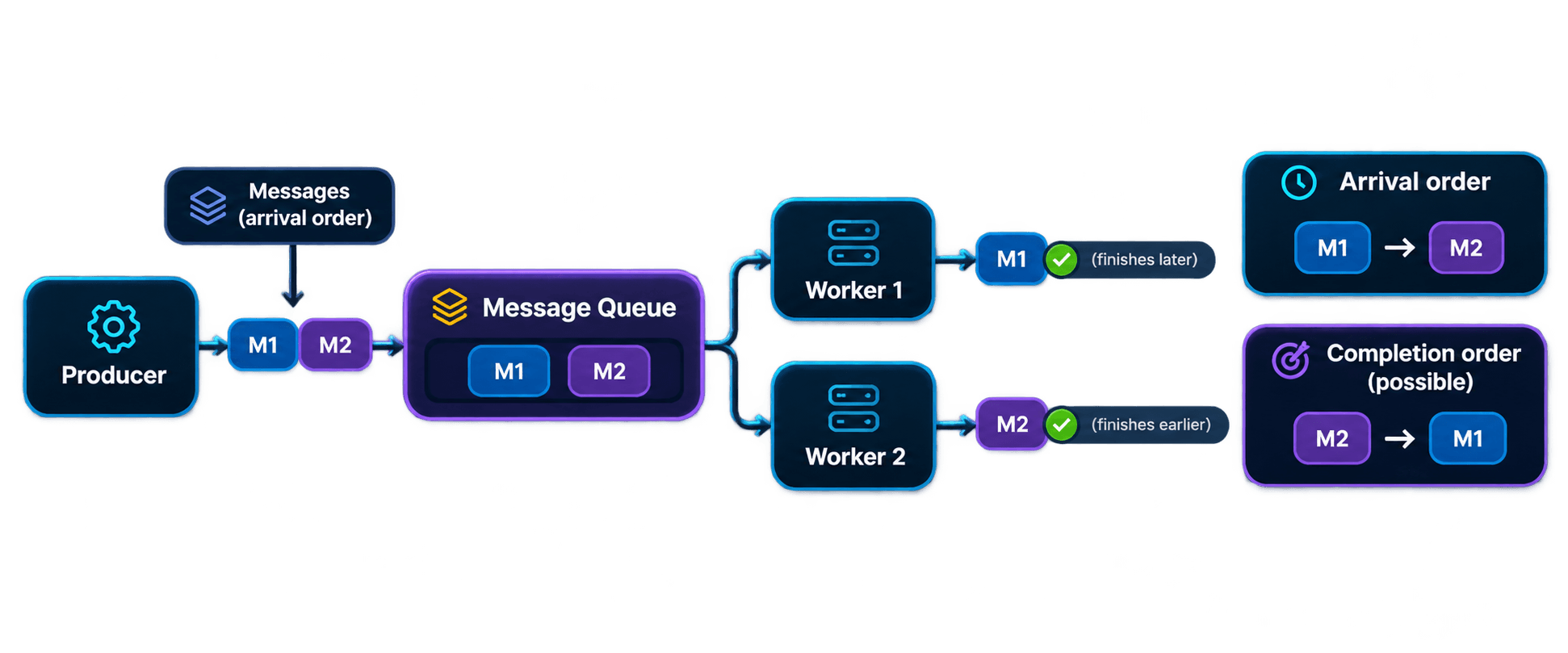
For EXample, M1 may take five seconds to process while M2 takes only one second. Even though M1 arrived first, M2 may complete first.
Message processing sequence
COMMON CAUSES include different processing times, concurrent execution, network delays, retries, and consumer failures.
Levels of message ordering
Not every application requires the same ordering guarantee.
The required level depends on business dependencies and the capabilities of the messaging system.
Messages can be processed in any order. Multiple consumers work independently, maximizing concurrency and throughput.
Arrival: M1 → M2 → M3
Processing: M3 → M1 → M2
Examples: Independent Analytics events and image processing jobs.
Messages sharing the same partition key or ordering group are processed in sequence. Different partitions or groups can be processed concurrently.
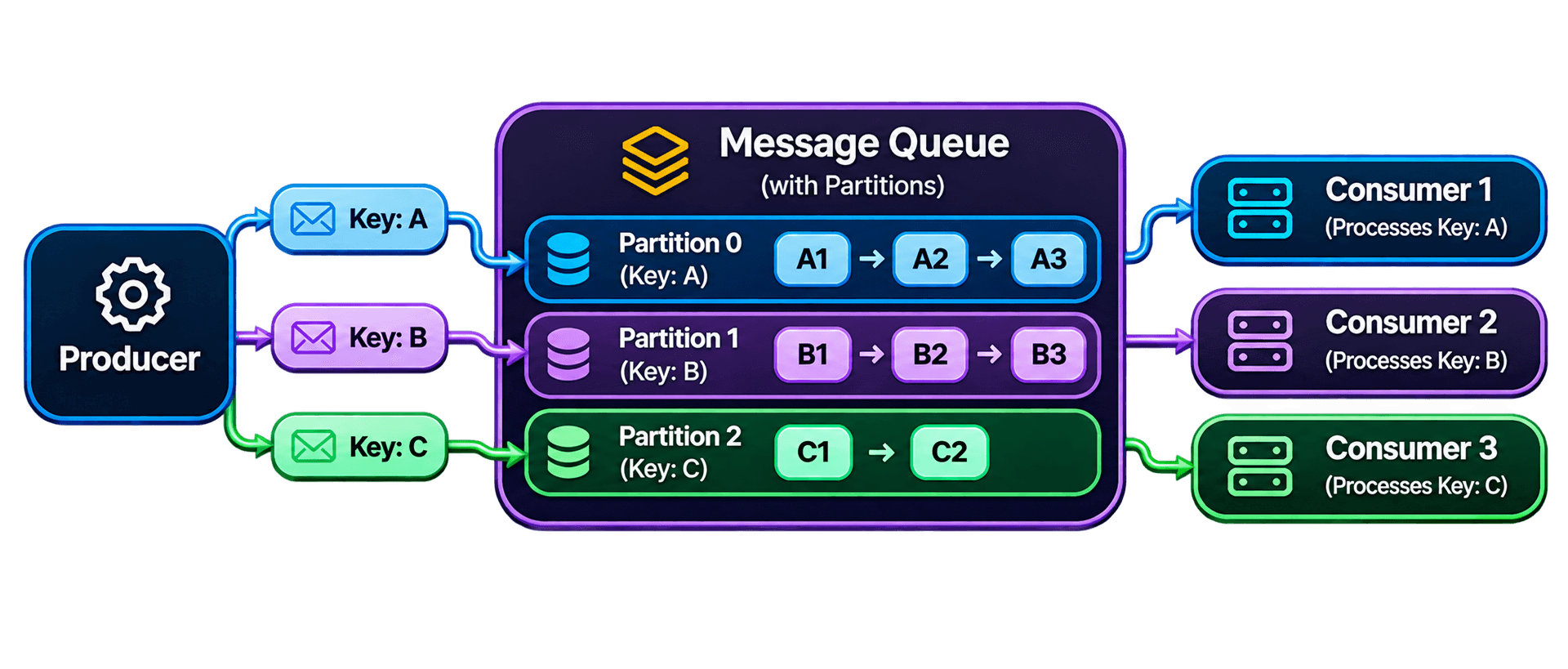
Examples: account updates, user activity, and order lifecycle events.
All messages must follow one consistent sequence across the system. This generally requires serialized processing or coordination between consumers.
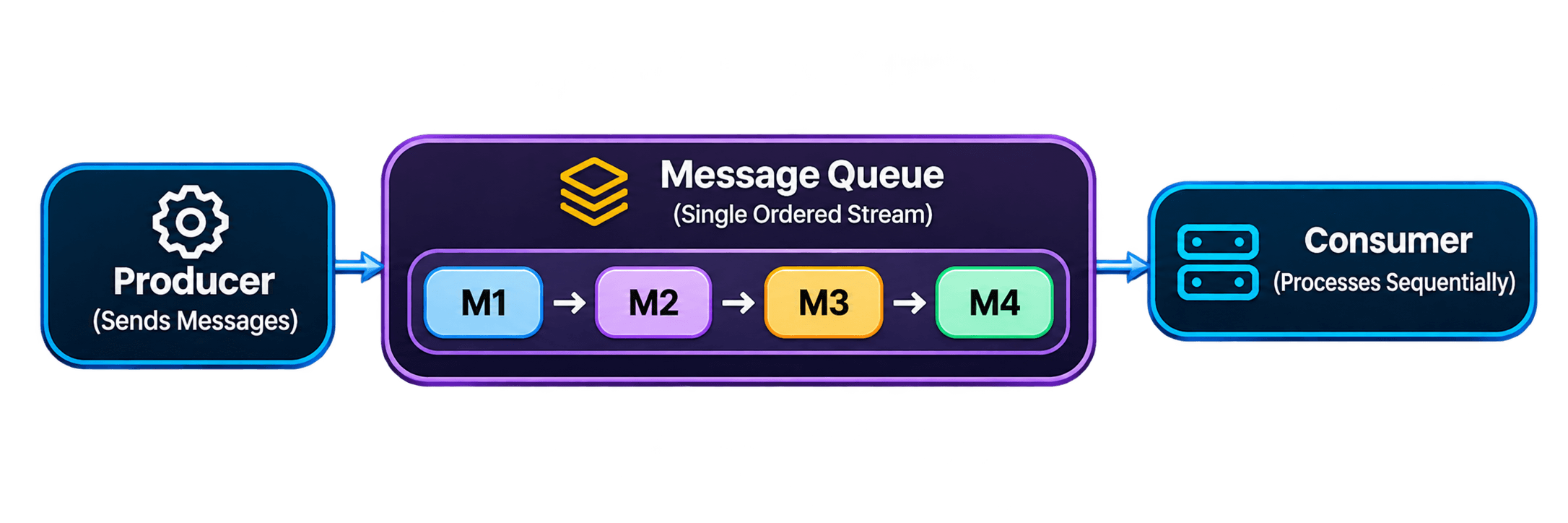
Examples: workflows that require one global sequence of operations.
How do we preserve message ordering?
A Common Approach is to group related messages using a STABLE KEY. All messages belonging to the same entity are routed to the same partition or ordered message group.
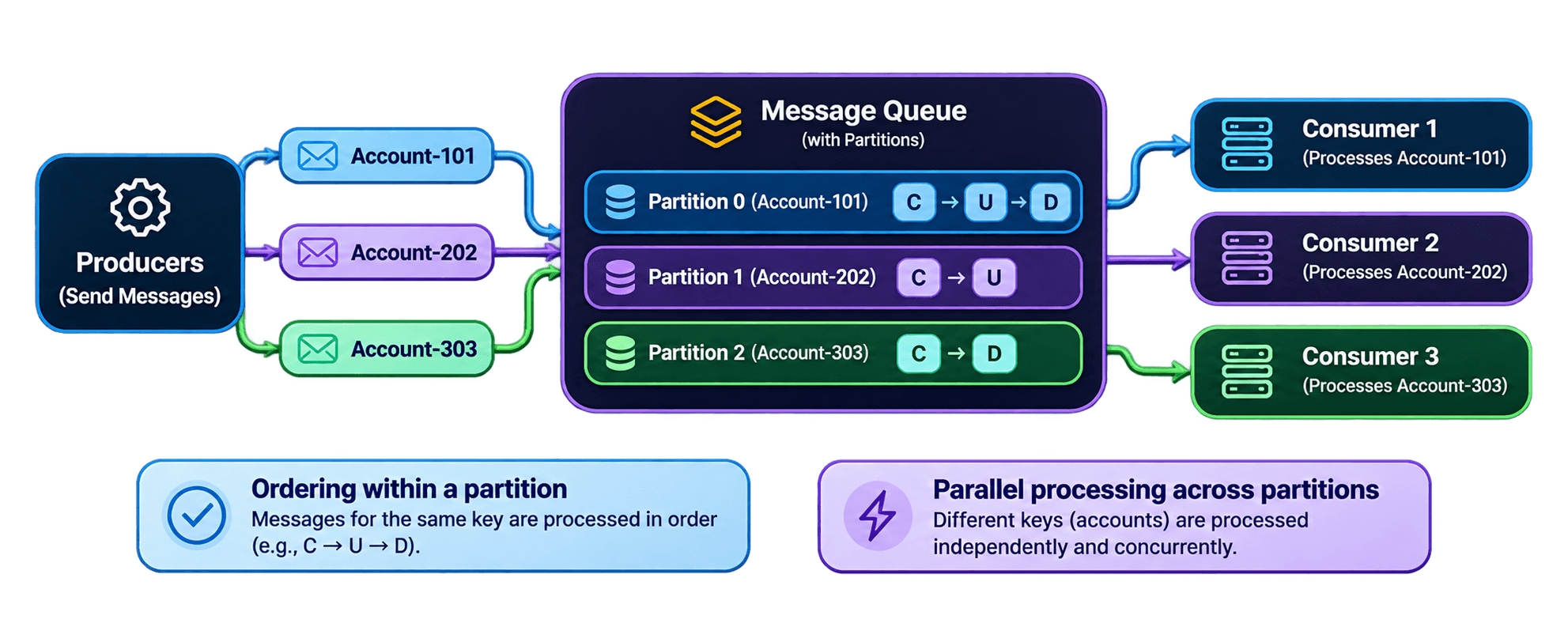
Messages for Account-101 must retain their relative order. However, Account-202 and Account-303 can be processed independently and concurrently.
Use a key such as accountId or orderId to route related messages to the same partition. Apache Kafka preserves record order within a partition.
Ensure only one consumer processes a given ordered group at a time. Different groups can still be handled concurrently. Some brokers provide message-group or session-based mechanisms.
Attach a sequence number or entity version to each message. Consumers can detect missing, stale, or out-of-order events and defer or reject processing when necessary.
Ordering vs. throughput
Preserving order introduces coordination between messages. The stricter the ordering requirement, the less freedom the system has to process messages concurrently.
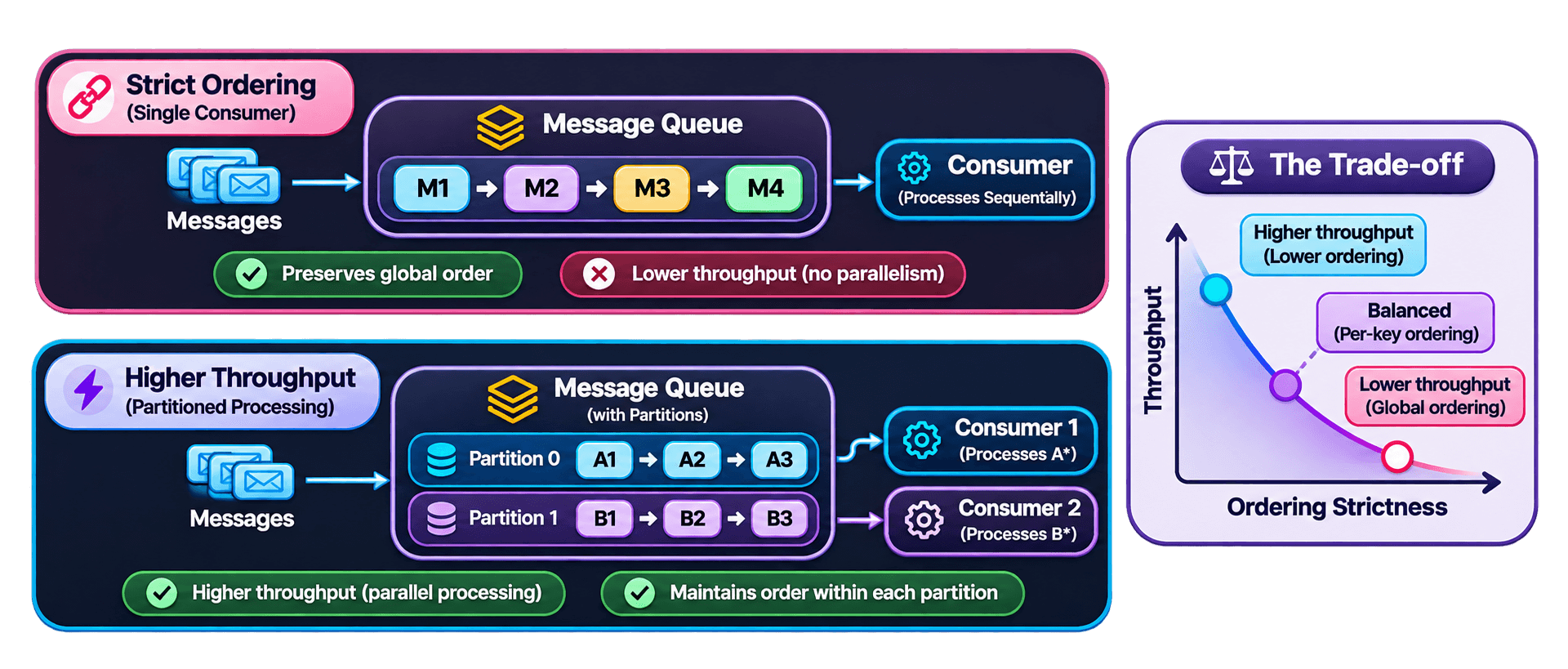
| Factor | Strict ordering | Partition-based ordering |
|---|---|---|
Ordering scope | Across the entire stream. | Within each partition or group. |
Concurrency | Limited. | Parallel across independent partitions. |
Throughput | Usually lower. | Usually higher. |
Complexity | Requires coordinated sequential processing. | Requires stable key selection and partition management. |
What can still break ordering?
Even when a broker preserves message order, application-level processing can introduce ordering problems.
1. Retries and failed messages
2. Multiple in-flight messages
3. Partition key selection
4. Consumer failures and rebalancing
When should you enforce ordering?
- Order lifecycle events
- Account state changes
- Inventory updates for the same item
- Financial transaction state transitions
- Independent image processing
- Independent email notifications
- Analytics aggregation
- Independent background tasks
Interview question:
Queue vs Pub/Sub
Message queues and Publish/Subscribe (Pub/Sub) are two messaging patterns used for asynchronous communication. The key difference is how messages are distributed to consumers.
Queue
One message → One consumer
Pub/Sub
One event → Multiple subscribers
Message Queue - Work Distribution
In a typical competing-consumer model, multiple workers listen to the same queue. When a message becomes available, one worker receives and processes it.
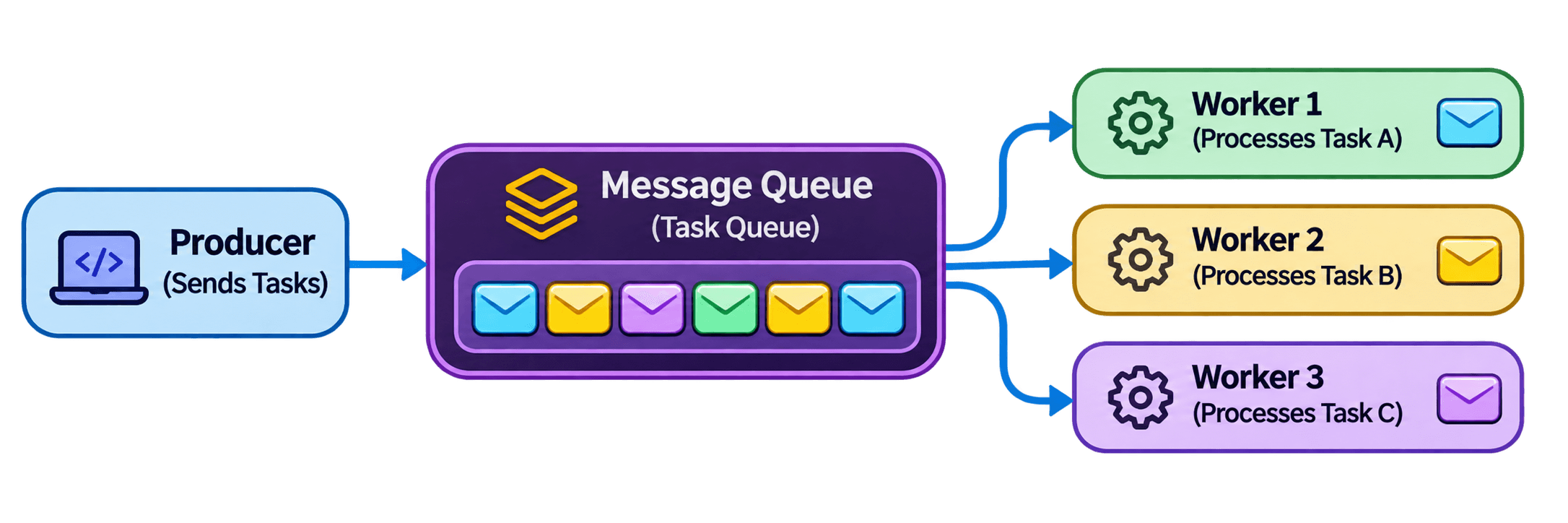
Example: Background invoice generation
Work distribution
The actual distribution depends on worker availability, processing speed, and broker scheduling. The important point is that workers share the workload instead of each processing every message.
Pub/Sub - Event Distribution
In the Publish/Subscribe pattern, a PRODUCER publishes an event to a TOPIC. Multiple independent subscribers receive their own copy of that event and process it for different purposes.
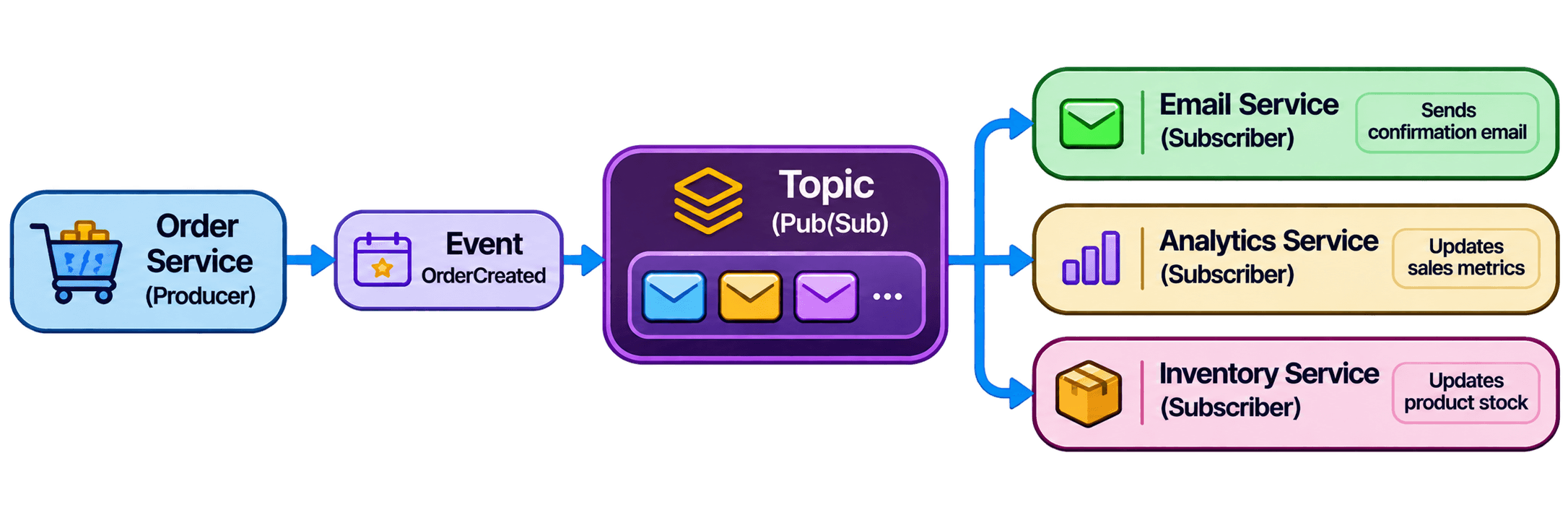
Example: OrderCreated event
When a customer places an order, the Order Service publishes an OrderCreated event. Different subscribers react to the same event:
Email Service
Sends an order confirmation email.
Analytics Service
Updates order and sales statistics.
Inventory Service
Updates product stock.
Each subscriber processes the event independently. A failure in one subscriber does not inherently prevent the other subscribers from processing their copies, although actual isolation depends on the messaging system.
Queue vs Pub/Sub - Compariso
| Characteristic | Queue | Pub/Sub |
|---|---|---|
| Primary purpose | Work distribution | Event distribution |
| Message delivery | One consumer within a competing-consumer group | Multiple independent subscribers |
| Message copies | Typically one delivery per message within the group | A copy is made available to each subscription |
| Processing | Workers share the workload | Subscribers process events independently |
| Scaling | Add workers to increase processing capacity | Scale subscribers independently |
| Common use | Background jobs and task processing | Event-driven communication |
| Example | Generate an invoice | OrderCreated event |
Where Does a Message Queue Fit?
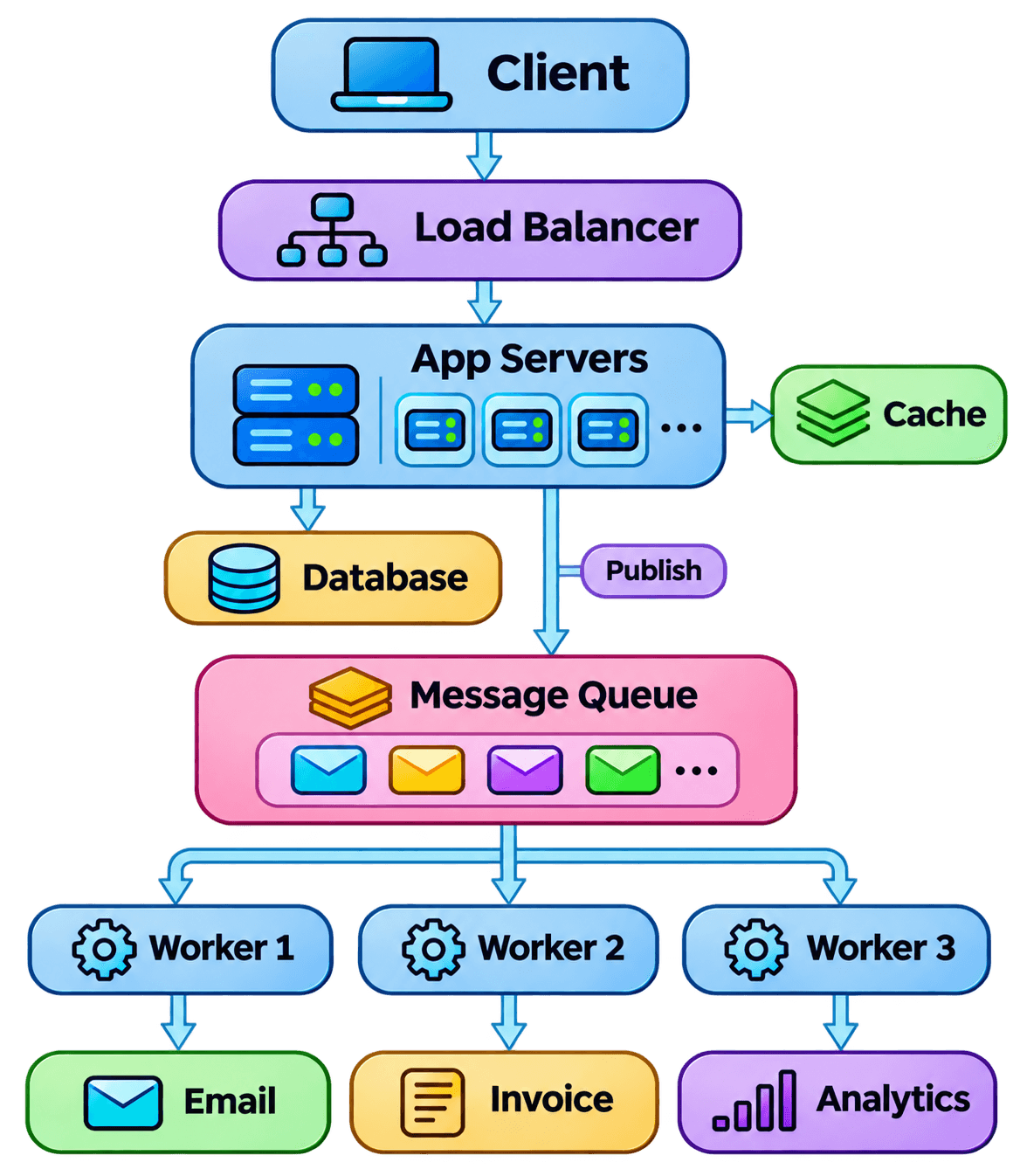
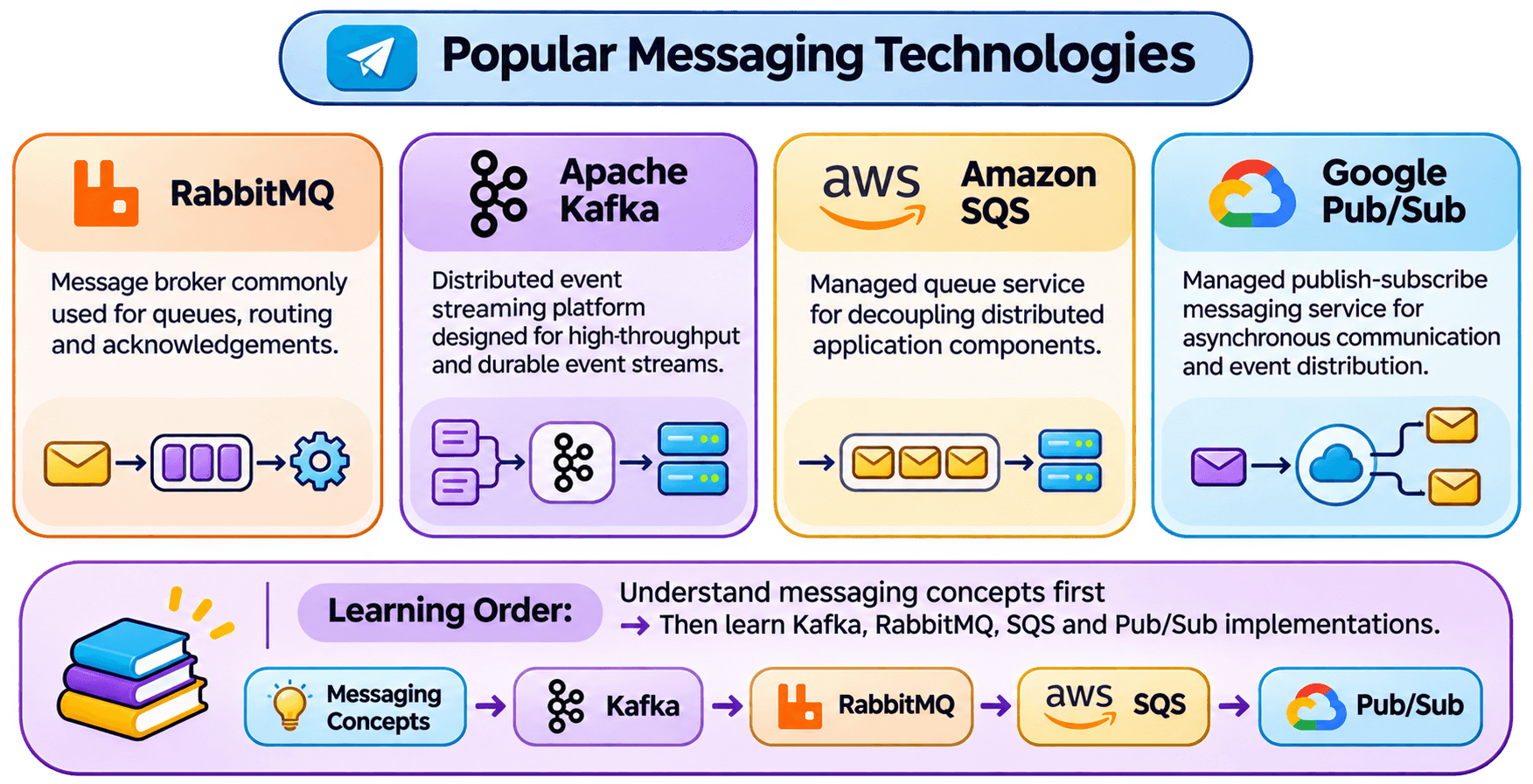
A message QUEUE connects application services with background WORKERS, enabling asynchronous communication without blocking the main request path.
Advantages and Disadvantages
| Aspect | Benefit | Trade-off |
|---|---|---|
| Decoupling | Services become less tightly coupled | Adds another infrastructure component |
| Asynchronous processing | Long-running work can leave the request path | Results may not be immediately available |
| Traffic buffering | Absorbs temporary traffic spikes | Large queues can increase latency |
| Scaling | Consumers can scale independently | Concurrency can introduce ordering and consistency challenges |
| Reliability | Retries can recover from temporary failures | Retries can result in duplicate processing |
Interview Questions