Understanding Scalability
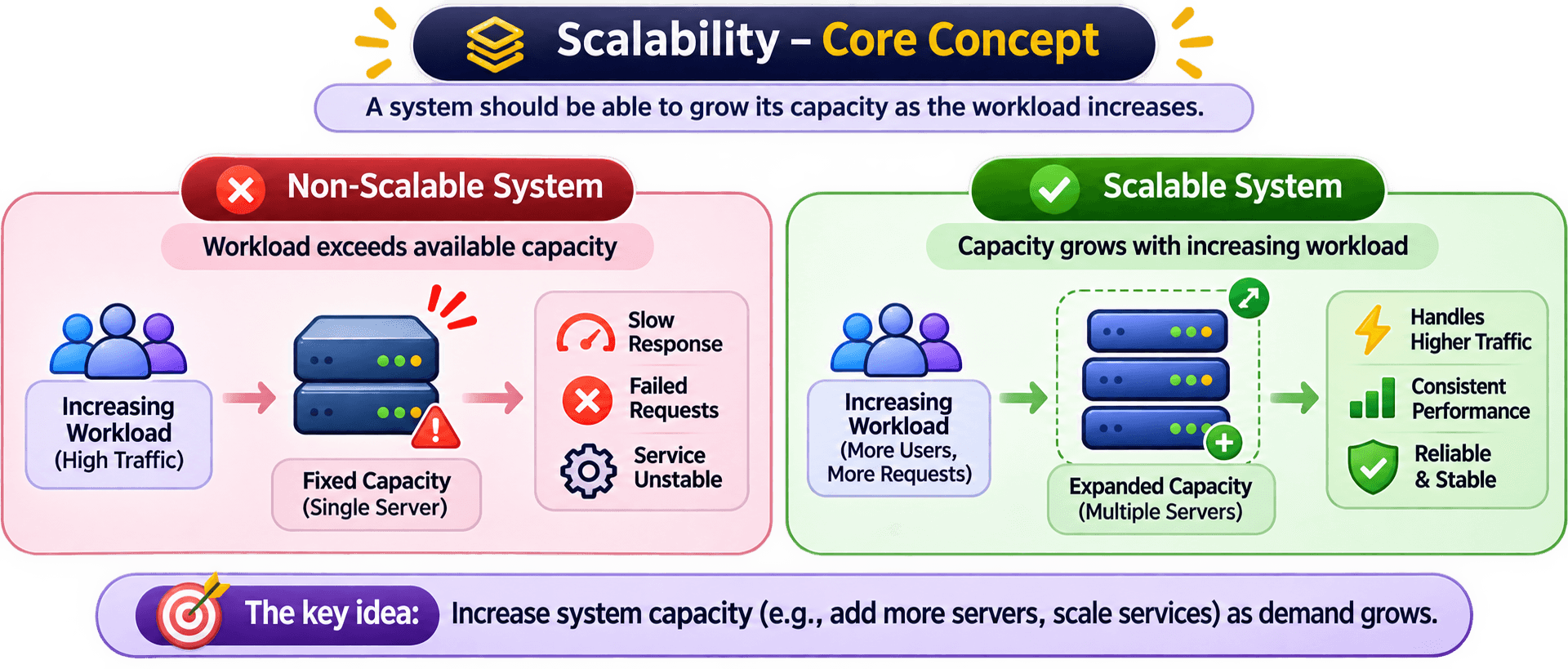
SCALABILITY is the ability of a system to handle an increase in workload by adding or adjusting computing resources while maintaining acceptable performance and reliability.
In simple terms, a scalable system can grow as the number of users, requests, or amount of data increases without requiring a complete redesign of its architecture
Consider an Application that initially serves only a few Hundred USERS.
As the application becomes popular, the number of users and incoming requests starts increasing.
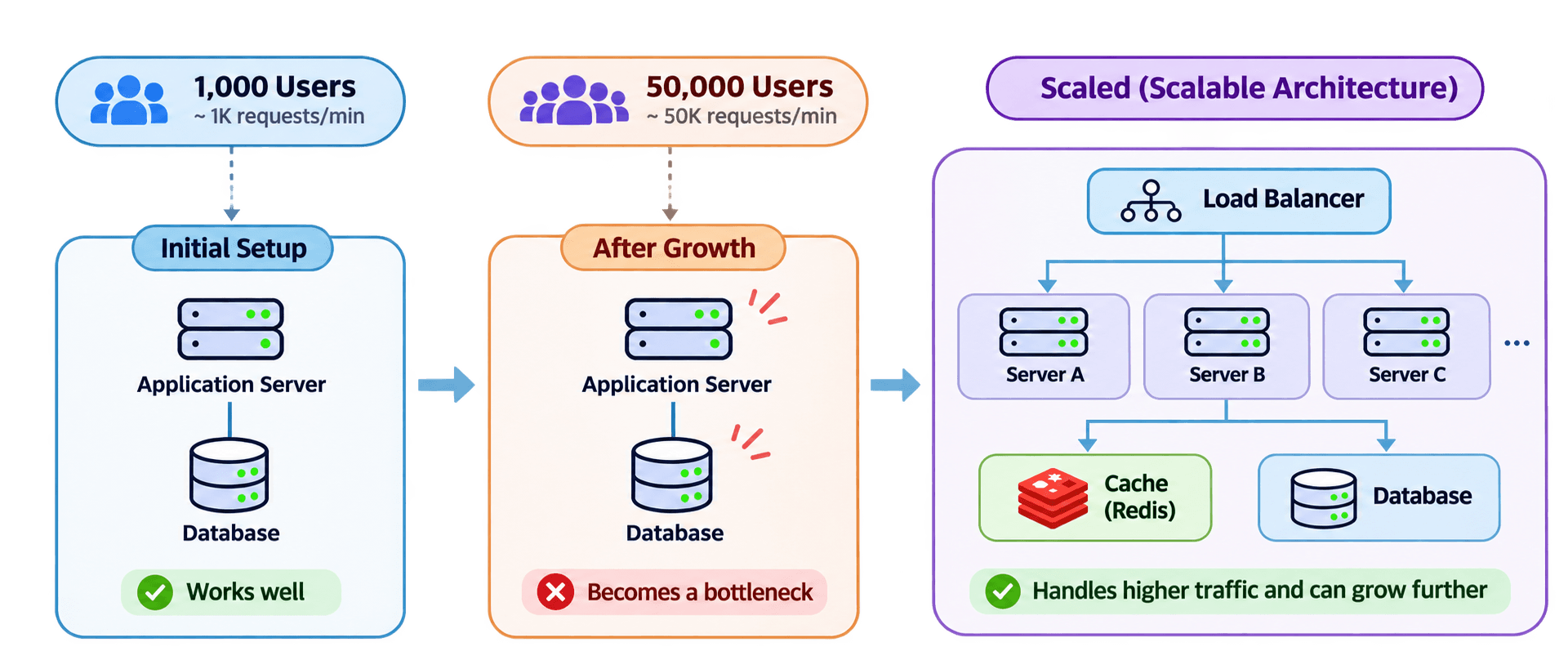
Initially: The application handles 1,000 Req/Min without any difficulty.
After growth: The application now receives 50,000 req/min. The existing infrastructure may struggle to process all incoming requests efficiently.
This creates a CHALLENGE :
Que - How can the application handle the increased workload without becoming slow or unavailable?
This is where SCALABILITY becomes important.
In simple terms
Core principle
What Does Increasing Workload Actually Mean?
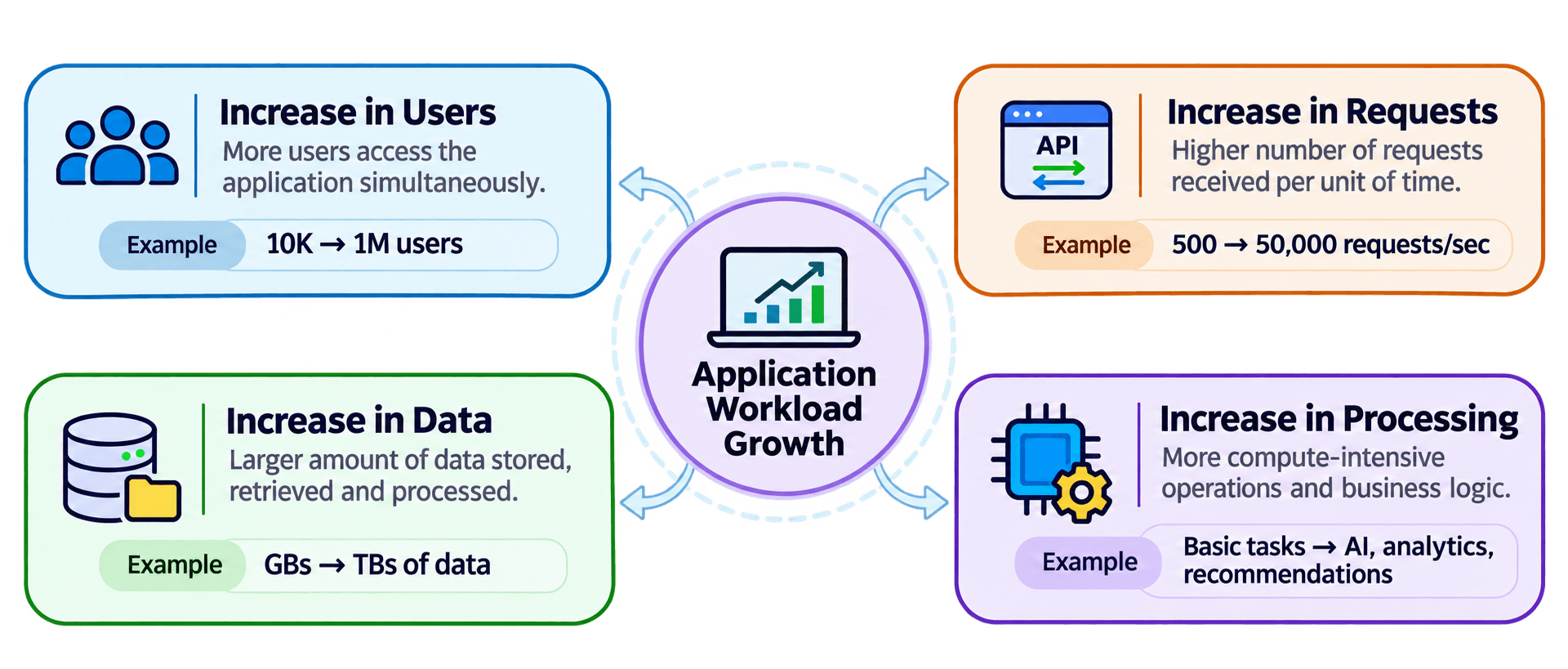
When we talk about scaling a system, we are not referring only to an increase in the number of users.
A system can experience growth in several different dimensions, and each one can create a different infrastructure challenge.
Consider an e-commerce application that is becoming increasingly popular.
Why Does a System Need to Scale?
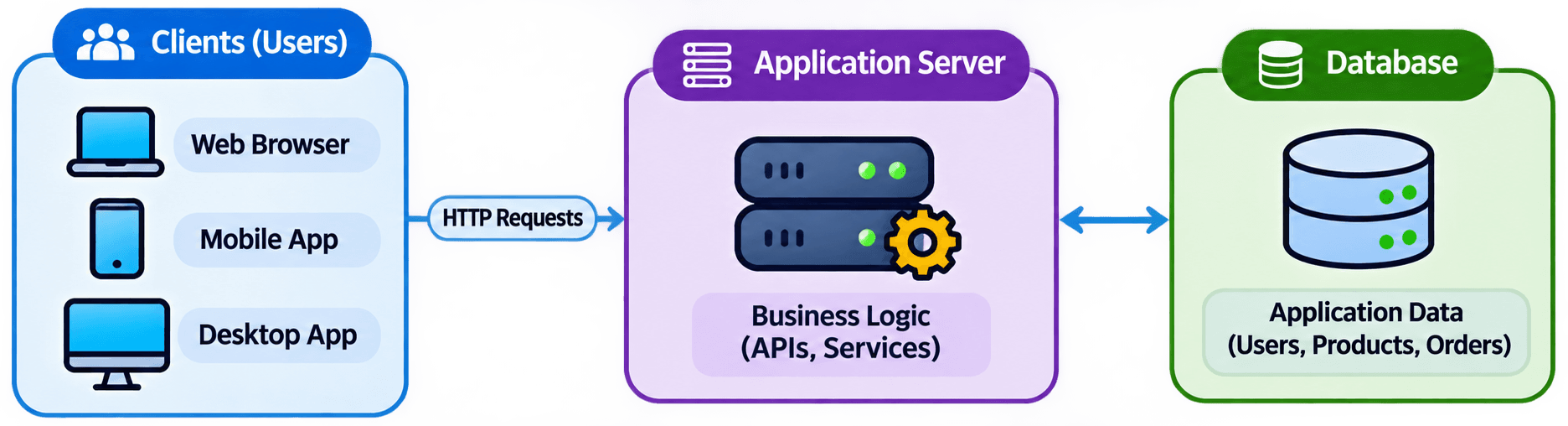
Consider an e-commerce application that initially runs on a single application server and a database.
During its early days, the application handles incoming requests without any significant performance problems.
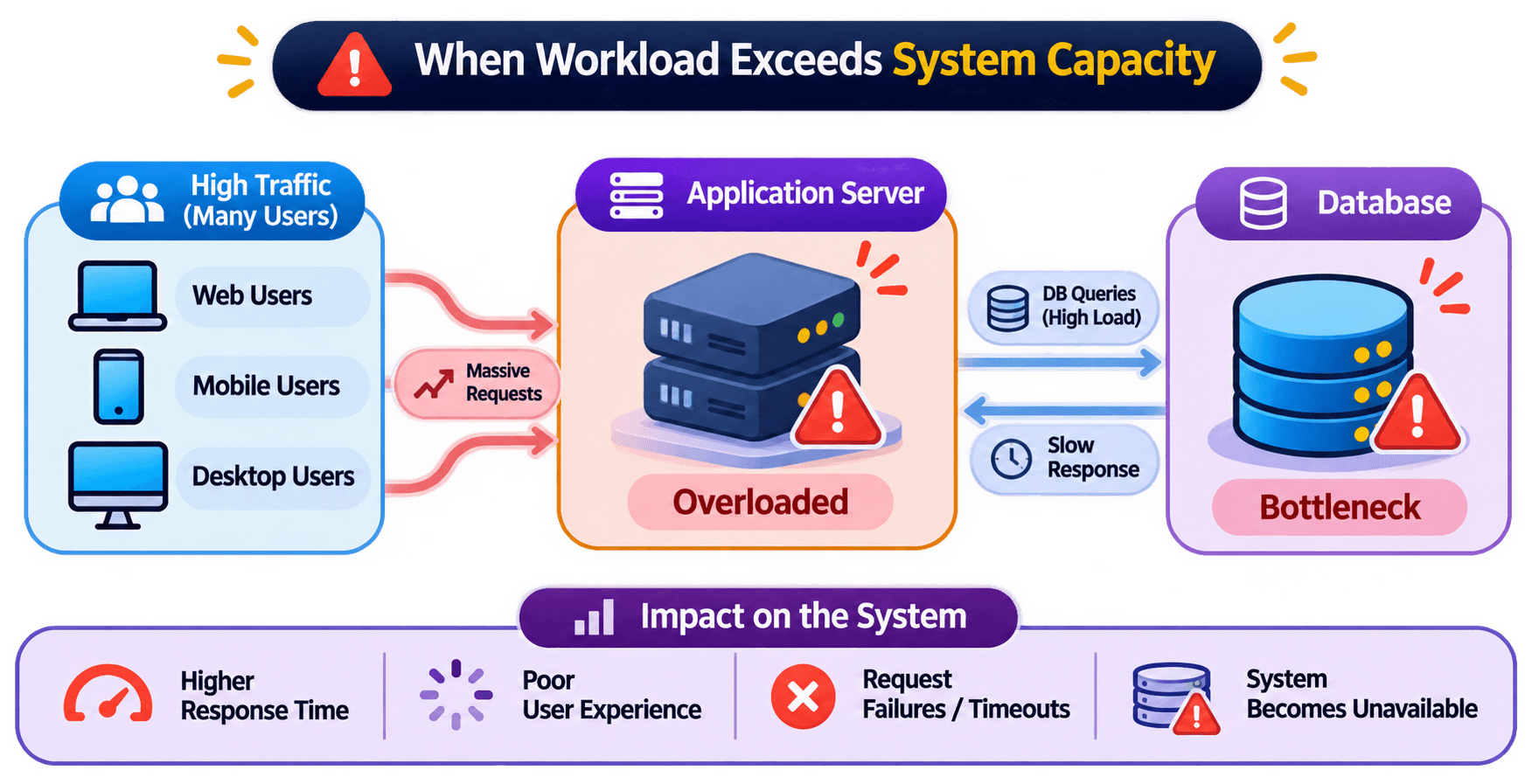
Now imagine the application becomes popular during a major sale.
Application Server Overload
A large number of incoming requests compete for CPU, memory, and available connections. The application server may become overloaded.
Increasing Response Time
Requests start taking longer to process. Users experience slow product searches, delayed checkout operations, and longer loading times.
Database Bottlenecks
The database receives more queries and concurrent connections. It may struggle with query execution, locking, disk I/O, or connection limits.
Service Degradation or Failure
If the system cannot process the incoming workload, requests may time out, fail, or become unavailable.
How Does a Scalable System Handle Growth?
Once an Application starts experiencing increasing workload, its Architecture needs to accommodate that growth.
The GOAL is to increase the system's capacity so that it can process more work without unacceptable degradation.
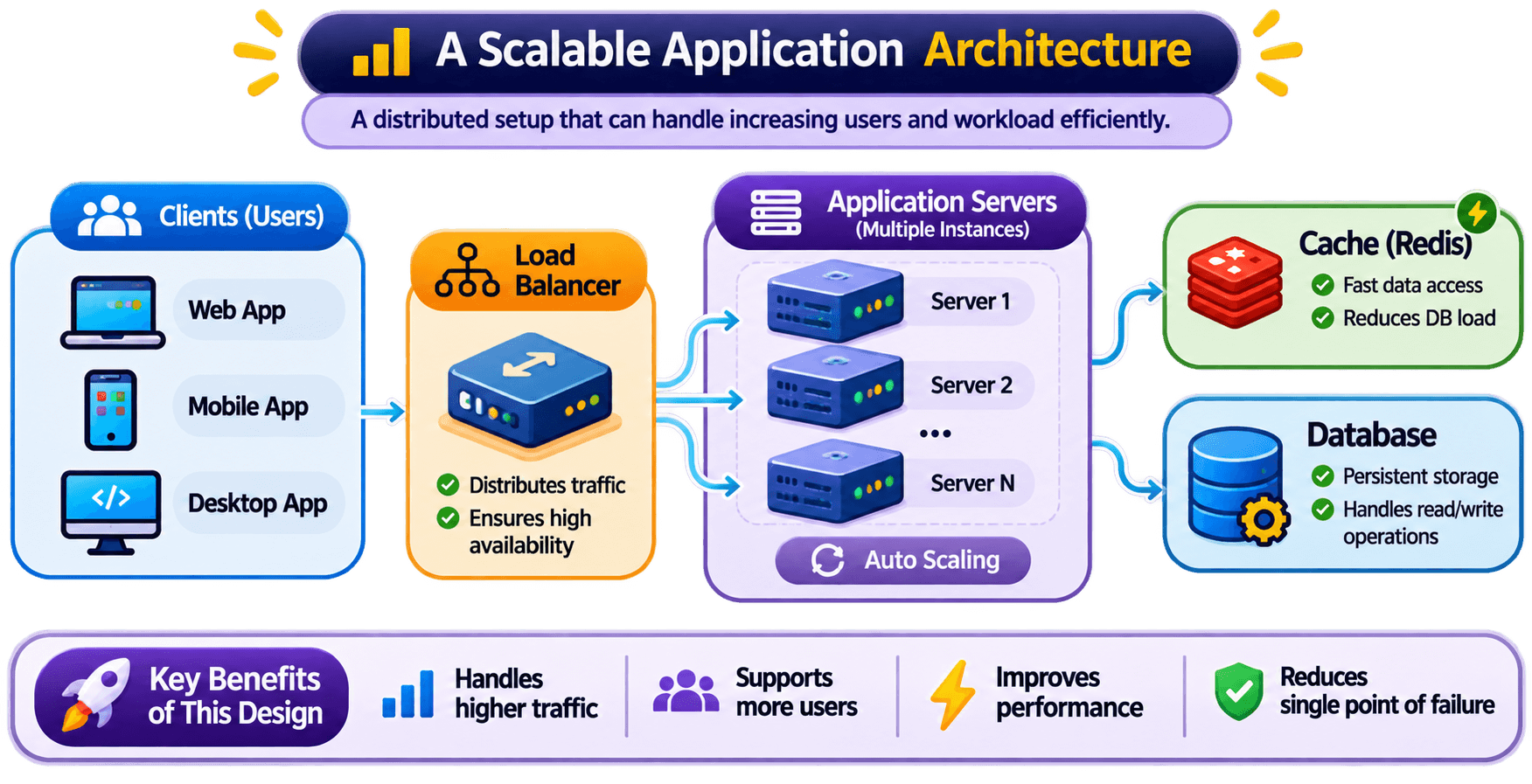
A system can use more powerful computing resources to handle additional workload.
Upgrade a server with more CPU cores, RAM, or faster storage.
A system can distribute workload across multiple application server instances.
Run multiple application servers behind a load balancer.
An Important Architectural Idea
A scalable system should be designed so that its components can accommodate growth according to their individual resource requirements.
For example:Application Layer
Handle more incoming API requests.
Database Layer
Handle increased reads, writes, and data volume.
Caching Layer
Reduce repeated work and unnecessary database requests.
Processing Layer
Handle background jobs and computational workloads.
Scalability Does Not Mean Unlimited Capacity
It is important to understand that no system has unlimited resources.
Every application has constraints such as:
CPU, memory, and processing capacity.
Disk capacity, I/O throughput, and data storage limits.
Bandwidth, latency, and network throughput.
Database capacity, cache limits, and external API constraints.
A system may scale successfully at the application layer but still experience limitations in its database or another dependent service.
Therefore, scalability does not mean that a system can handle unlimited traffic.
It means that the system can be expanded in a planned and controlled way as workload increases, within practical technical and financial constraints.
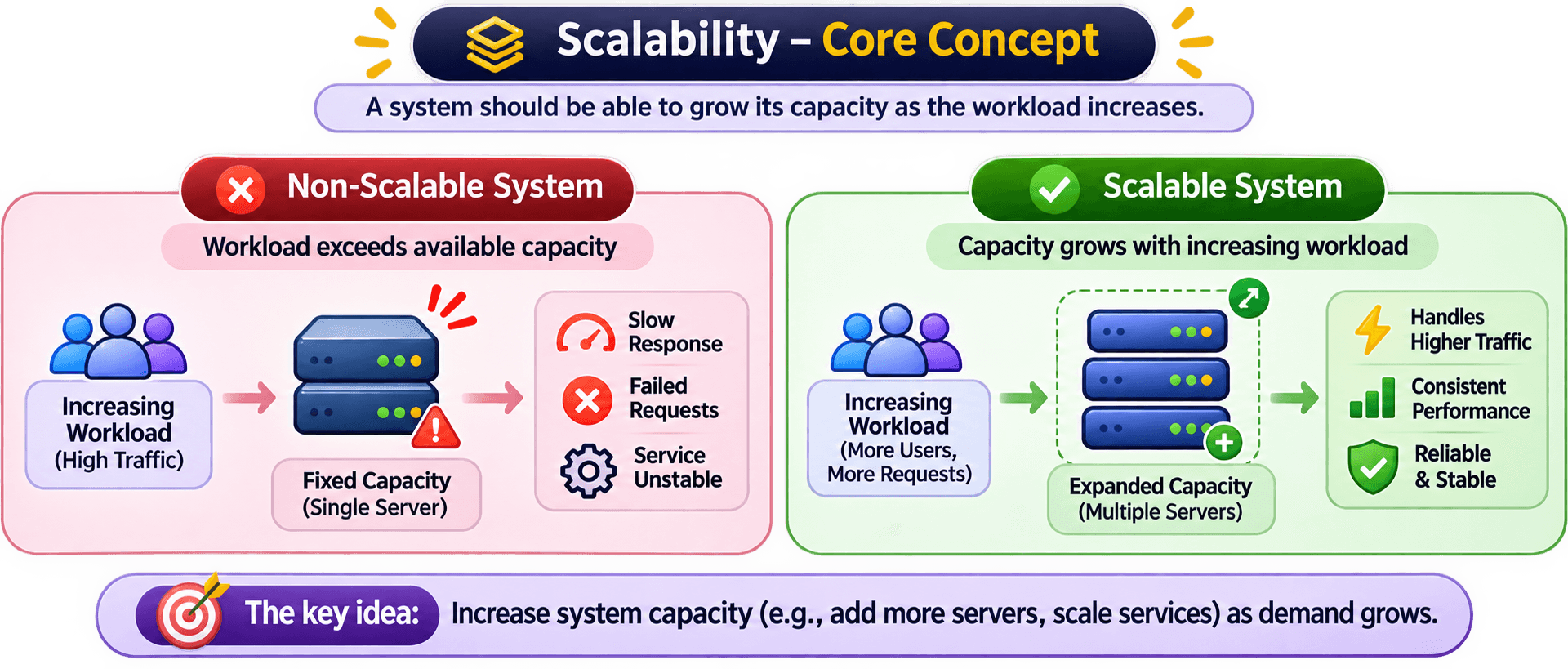
The Core Idea Behind Scalability
Without Scalability
With Scalability
Types of Scalability
Scalability describes a system's ability to handle increasing workloads.
There are 2 Fundamental APPROACHES to increasing system capacity:
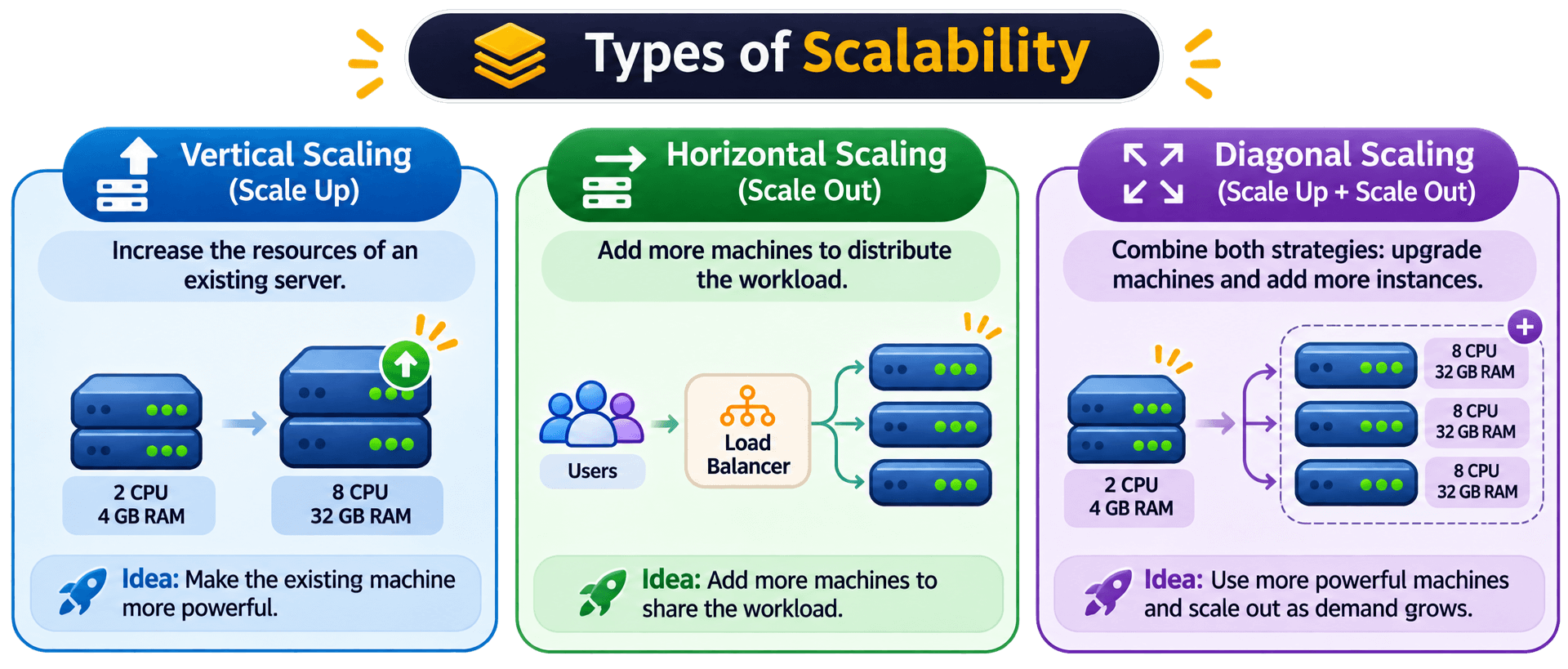
- 1. Vertical Scaling (Scale Up): Increase the resources of an existing machine.
- 2. Horizontal Scaling (Scale Out): Add more machines to distribute the workload.
A 3rd approach, Diagonal Scaling, combines BOTH Strategies.
Let's understand each approach using an e-commerce application that is experiencing increasing traffic.
Vertical Scaling
Horizontal Scaling
Diagonal Scaling
1. Vertical Scaling (Scale Up)
Vertical scaling is the process of increasing the computing resources of an existing machine to handle a larger workload.
Instead of adding more servers, we make the existing server more powerful.
How does it work ?
Imagine an E-commerce application running on a single application server.
Initially, the server has :
2 CPU cores
4 GB RAM
Limited processing capacity
As traffic increases, the server starts struggling to process incoming requests.
One solution is to upgrade the existing machine :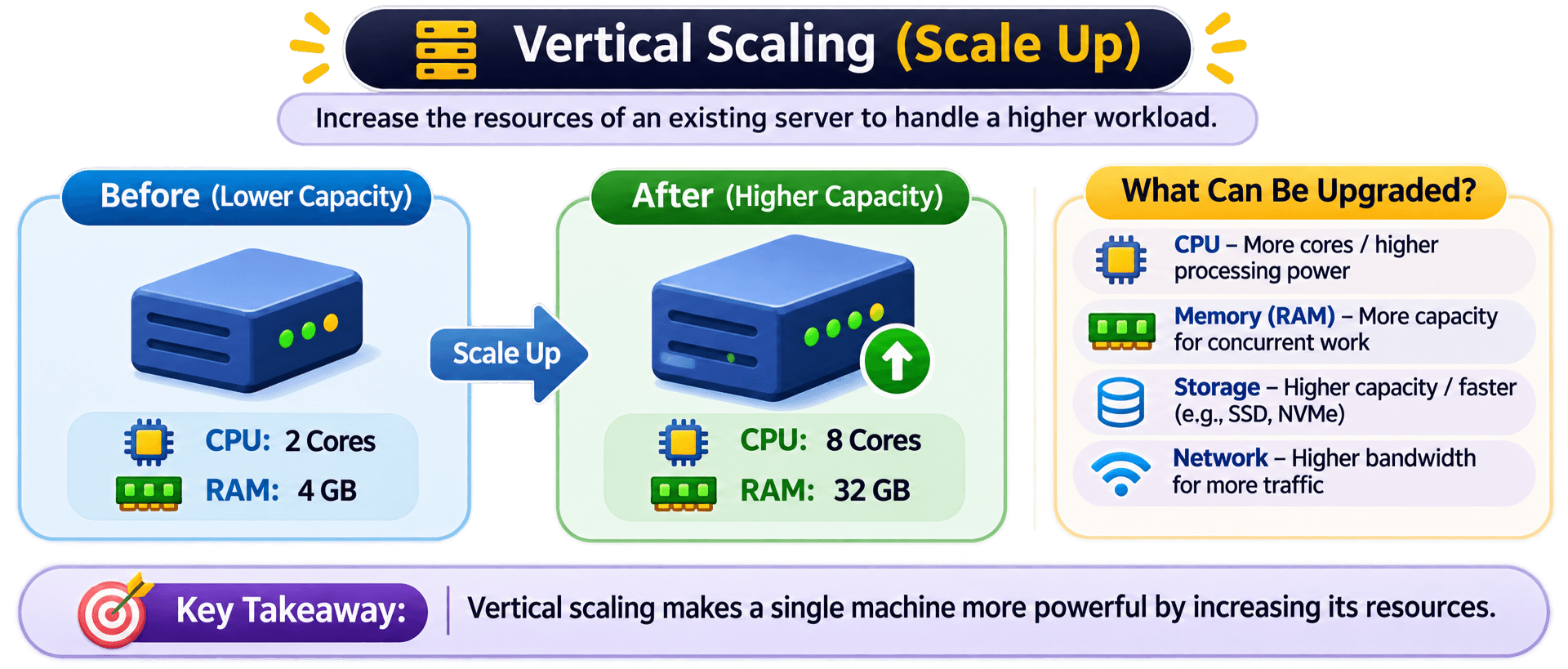
What can be upgraded ?
Increase the number of CPU cores or use a more powerful processor.
Example: 2 cores → 8 cores
Add more RAM to handle larger workloads and more concurrent operations.
Example: 4 GB → 32 GB
Upgrade to faster or higher-capacity storage.
Example: HDD → NVMe SSD
Increase network capacity to handle more incoming and outgoing traffic.
Example: Higher network bandwidth
Advantages of Vertical Scaling
🔶 Relatively simple to implement.
🔶 Often requires fewer architectural changes.
🔶 No need to distribute application requests across multiple application instances.
🔶 Can be useful for applications that are difficult to distribute across multiple machines.
🔶 Easier to manage compared with a distributed application architecture in some cases.
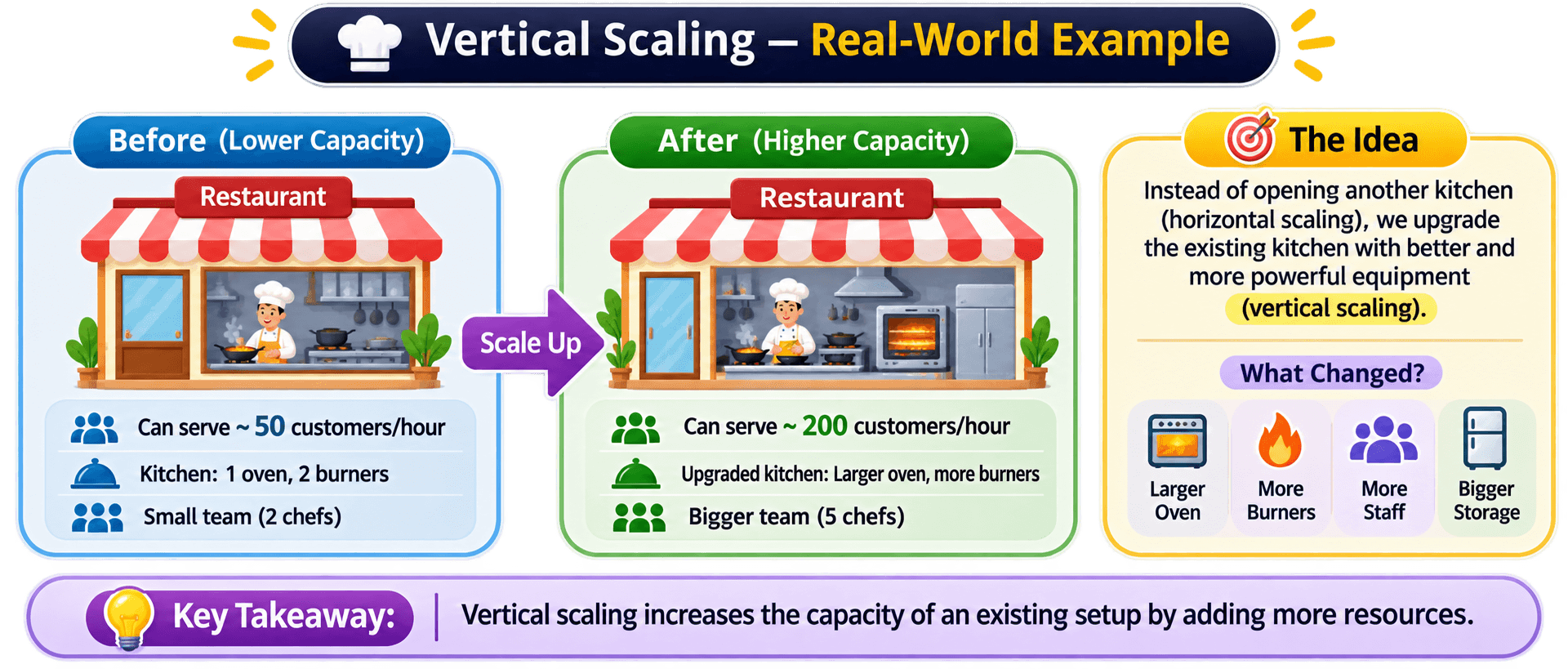
Real-world analogy
Limitations of Vertical Scaling
Every machine has an upper limit on CPU, RAM, storage, and network capacity.
Eventually, you cannot continue upgrading the same machine.
If the application depends on one server and that server fails, the application may become unavailable.
Increasing server resources does not automatically provide redundancy.
More powerful machines can become significantly more expensive as resource requirements grow.
Depending on the infrastructure and upgrade process, increasing hardware resources may require restarting or migrating the machine, potentially causing downtime.
2. Horizontal Scaling (Scale Out)
Horizontal scaling is the process of increasing system capacity by adding more machines or application instances and distributing the workload among them. Instead of making one server more powerful, we introduce additional servers to share the work.
How does it work ?
Consider the same e-commerce application.
Initially, it runs on one application server. As traffic increases, upgrading that server may not be sufficient or cost-effective.
Instead, we introduce multiple application server instances.
A Load Balancer distributes incoming requests across these instances.
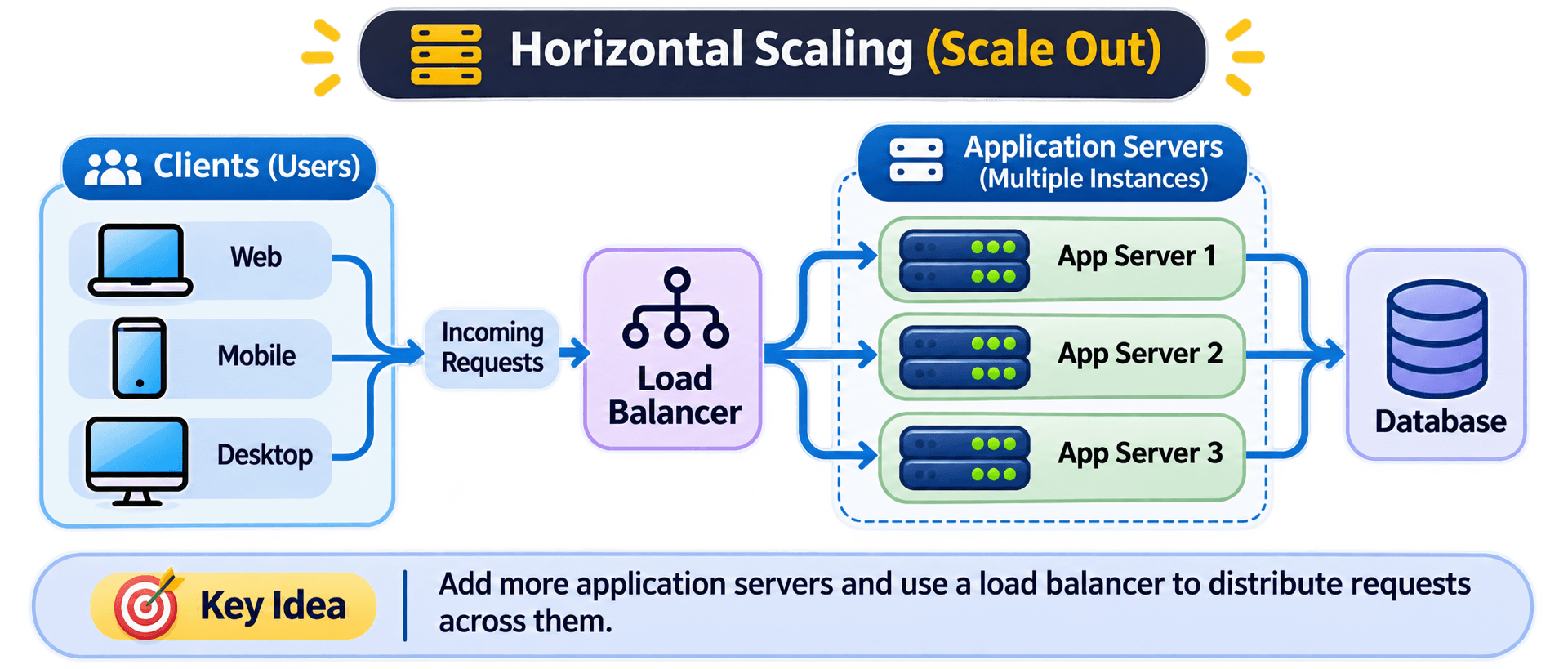
How are requests distributed ?
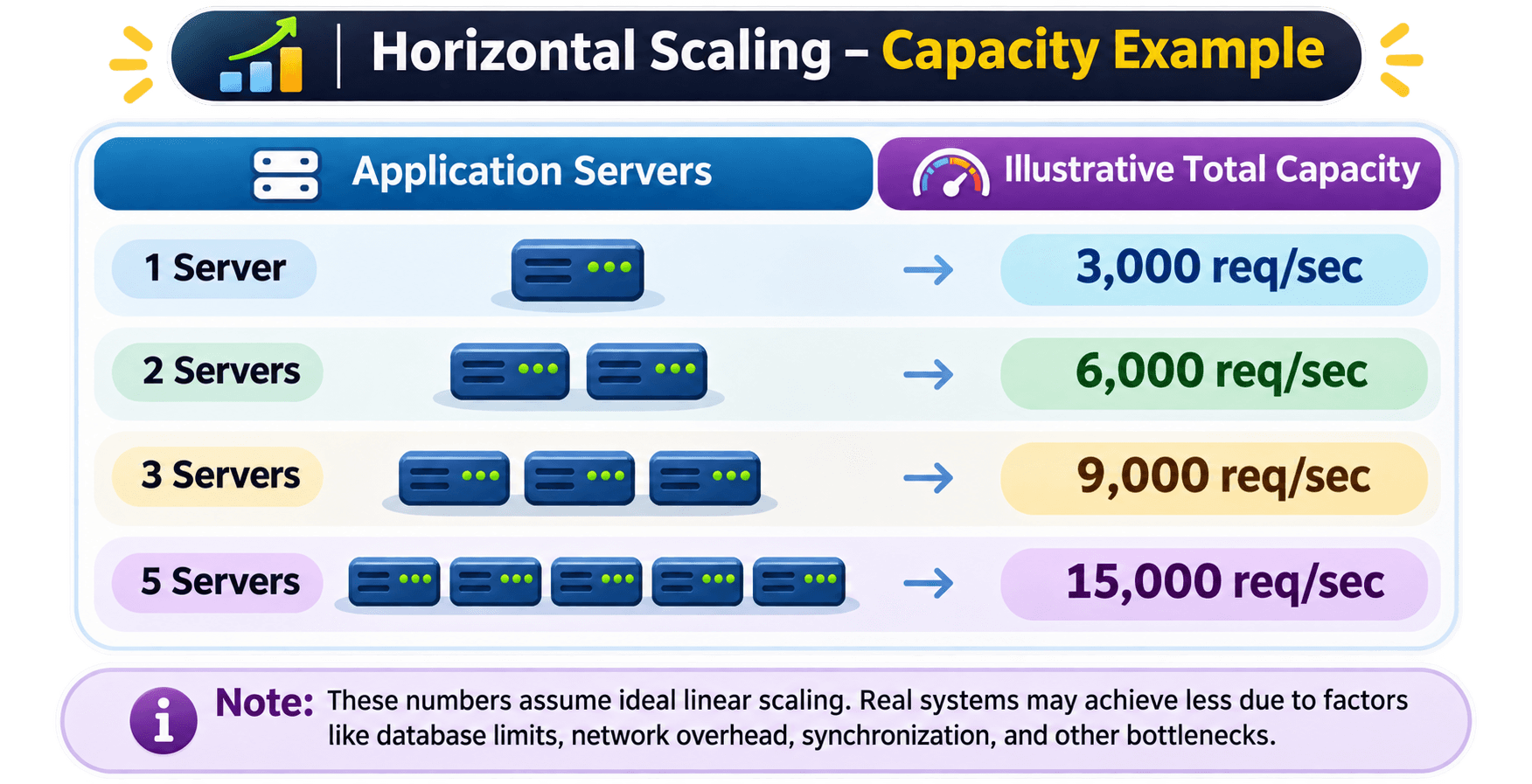
Suppose an application receives 9,000 requests per second and has three application server instances.
A load balancer distributes requests among the available servers.
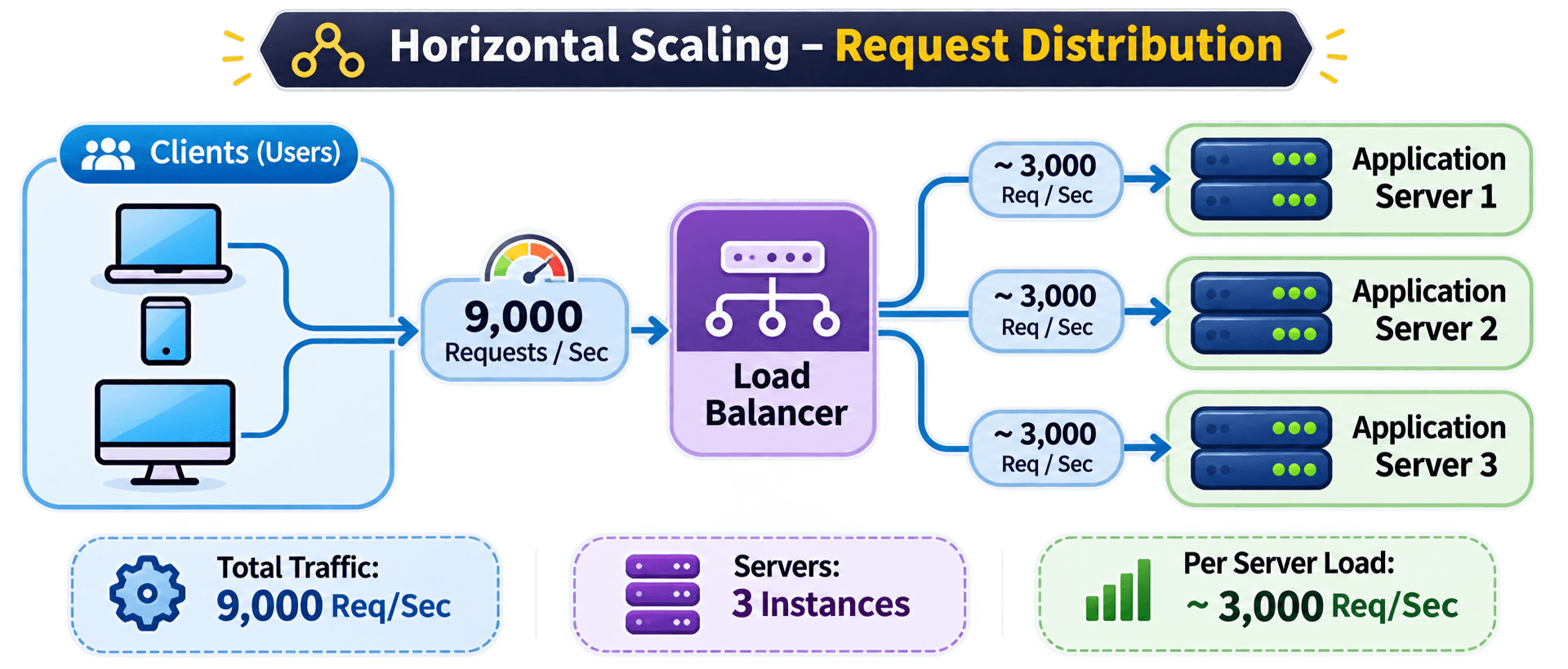
How does horizontal scaling increase capacity?
Imagine each application server can handle approximately 3,000 requests per second under a particular workload.
Advantages of Horizontal Scaling
🔶 Capacity can be expanded by adding more instances.
🔶 Workload can be distributed across multiple machines.
🔶 Can improve fault tolerance when instances are deployed independently.
🔶 Supports elastic infrastructure, where instances can be added or removed according to demand.
🔶 Often suitable for large-scale distributed applications.
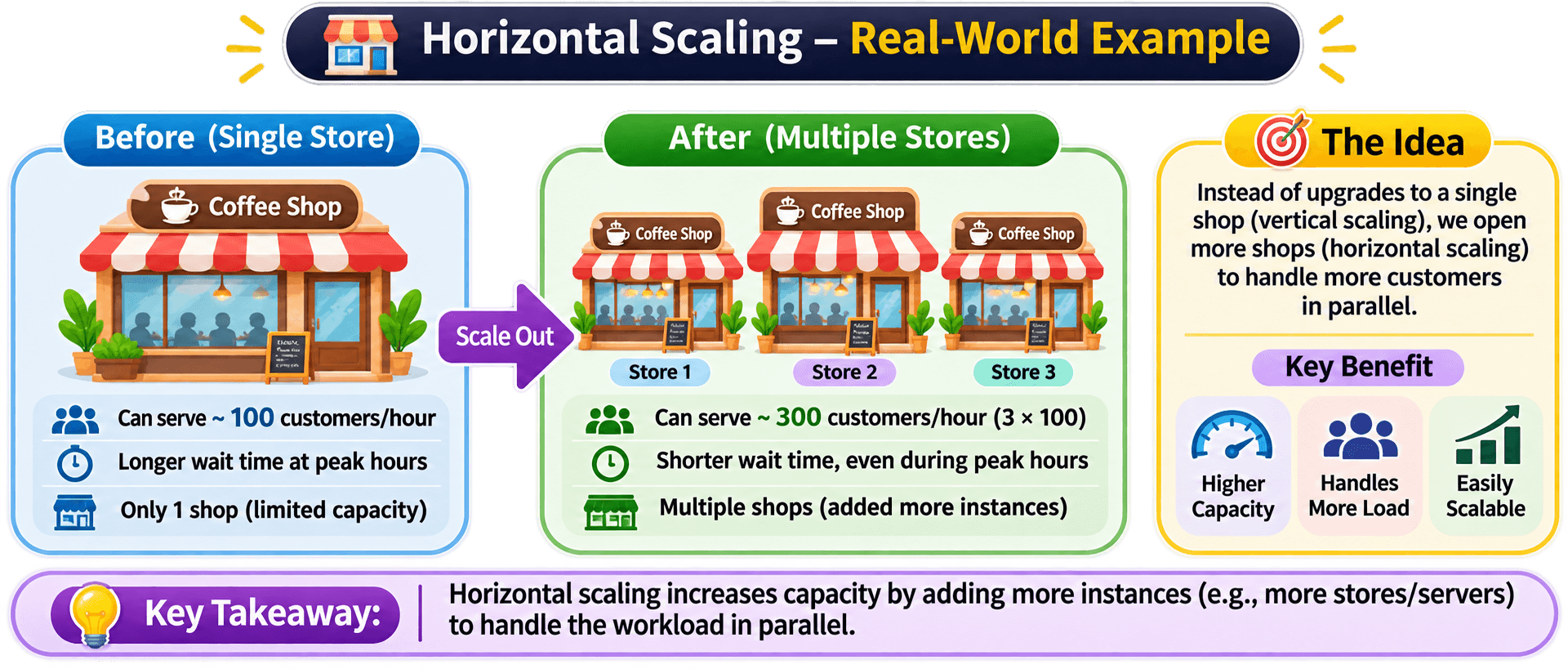
Real-world analogy
Limitations of Horizontal Scaling
Multiple application instances need coordination through networking, load balancing, service discovery, and other infrastructure components.
If application servers maintain sessions or other state locally, requests routed to different instances can create problems.
Shared session storage or other distributed state-management strategies may be required.
Distributed applications may need to coordinate data across multiple services or database nodes.
Maintaining consistency can become more challenging.
Adding application servers does not automatically increase database capacity.
If all instances depend on one overloaded database, the database can remain the bottleneck.
3. Diagonal Scaling (Scale Up + Scale Out)
Diagonal scaling combines vertical and horizontal scaling. First, individual machines are upgraded to handle more workload. When additional capacity is required, more machines are added to the system.
How does it work ?
Consider an application that initially runs on one server with :
- 2 CPU cores AND 4 GB RAM
As traffic increases, the server is upgraded to :
- 8 CPU cores AND 32 GB RAM
Later, as traffic grows further, additional application server instances are introduced behind a load balancer.
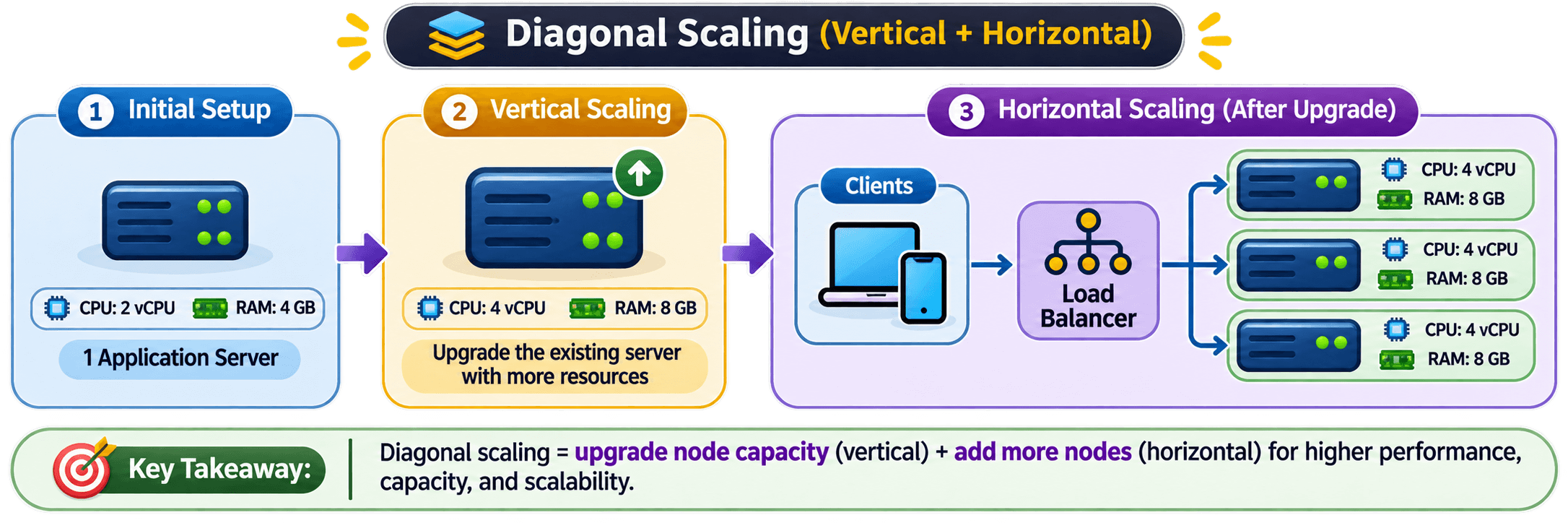
The scaling progression :
STAGE 01
Initial Infrastructure
One application server with limited computing resources.
STAGE 02
Vertical Scaling
Upgrade the existing server with more CPU, RAM, and storage.
STAGE 03
Horizontal Scaling
Add more upgraded application server instances and distribute traffic using a load balancer.
Advantages of Diagonal Scaling
🔶 Combines the benefits of vertical and horizontal scaling.
🔶 Allows infrastructure to grow in stages.
🔶 Provides flexibility when choosing resource upgrades and additional instances.
🔶 Can help balance infrastructure cost and operational complexity.
Limitations of Diagonal Scaling
🔶 Combines the operational challenges of both approaches.
🔶 Requires careful capacity planning.
🔶 Can increase infrastructure and management costs.
🔶 Does not automatically solve database or shared-service bottlenecks.
Real-world analogy
Vertical vs Horizontal vs Diagonal Scaling
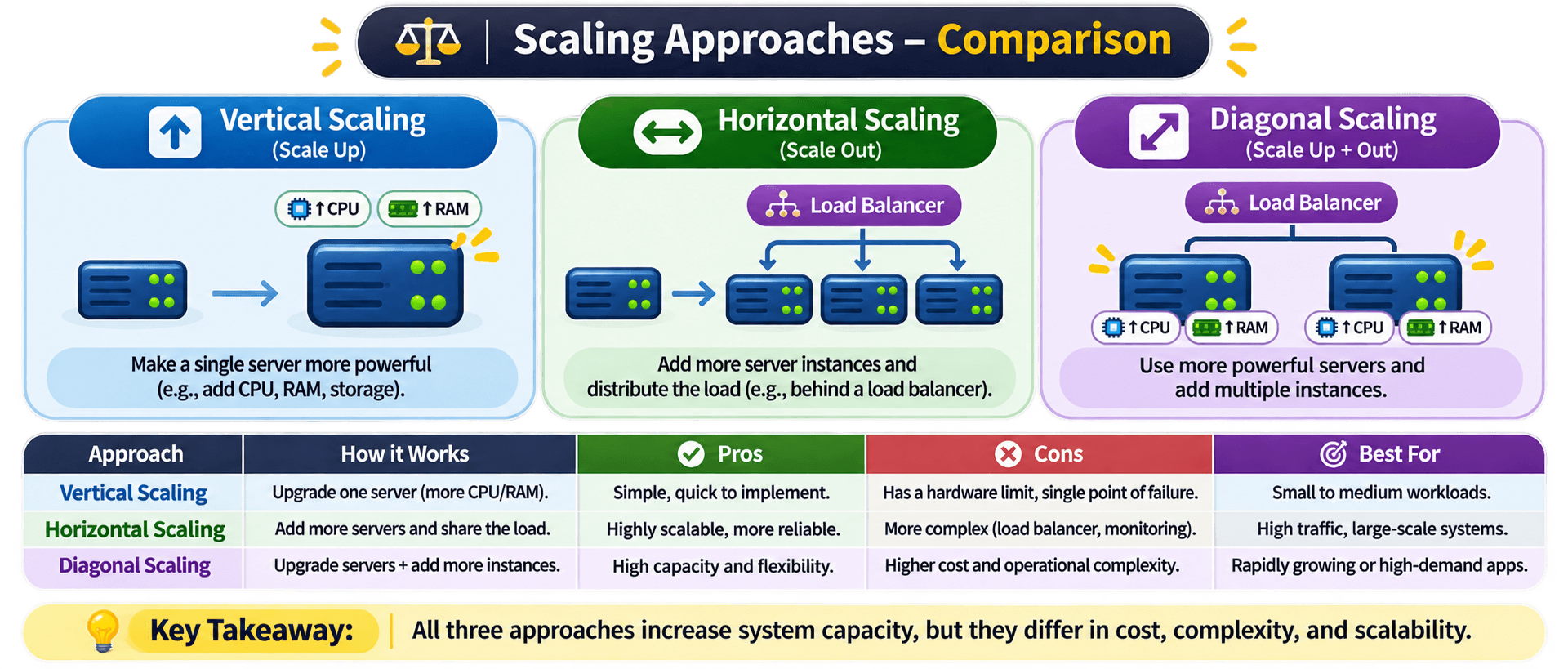
When should you use each approach ?
Suitable when:
- The workload is relatively small.
- Application architecture is difficult to distribute.
- A simpler infrastructure is preferred.
- The existing machine has room for upgrades.
Suitable when:
- Traffic is growing significantly.
- Multiple application instances can process requests independently.
- The system needs elastic capacity.
- Distributed architecture is appropriate.
Suitable when an application needs both more powerful individual machines and additional instances as its workload grows.
Is Auto Scaling Another Type of Scalability ?
This is an important distinction in system design.
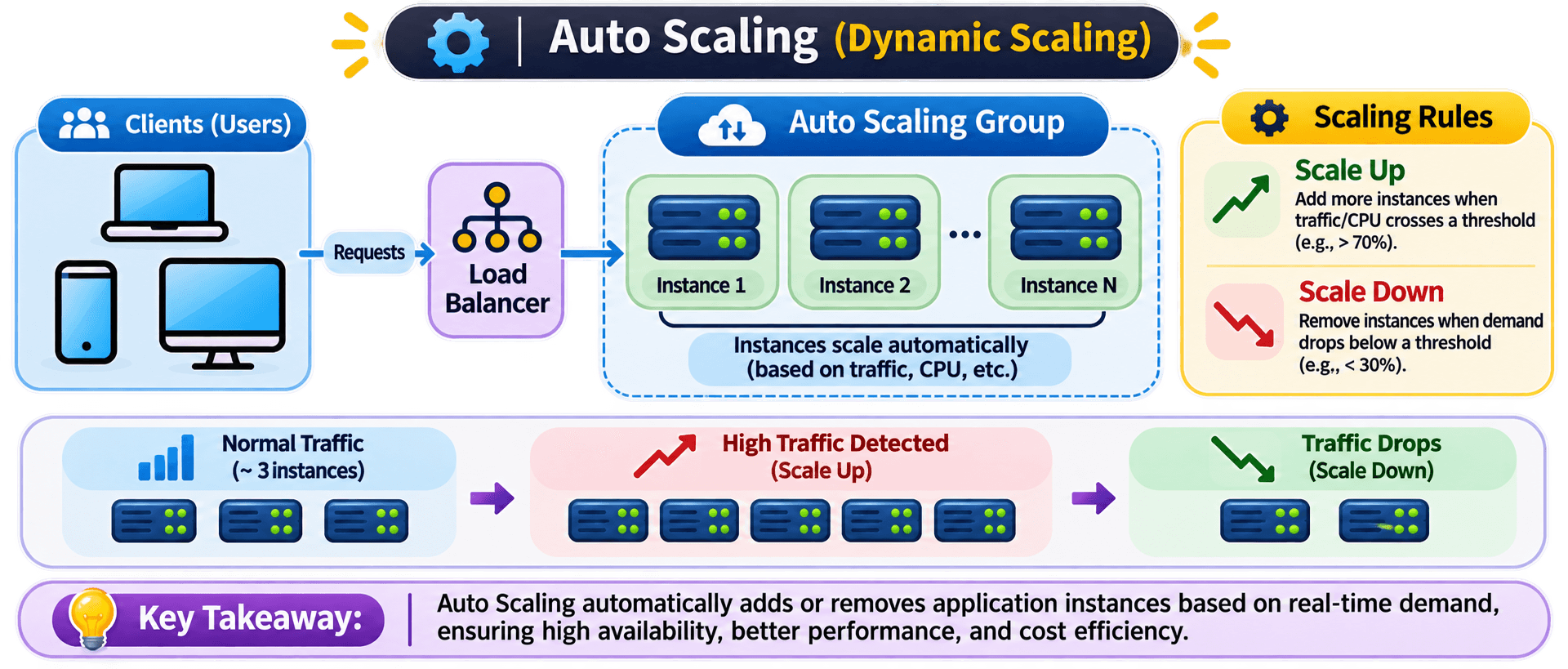
Auto Scaling is not a separate fundamental scaling approach. It is a mechanism that automatically adjusts infrastructure capacity according to workload or predefined policies.
For example :
- When traffic increases, additional application instances can be launched.
- When traffic decreases, unnecessary instances can be removed.
Remember the Core Concepts
Vertical Scaling
Horizontal Scaling
Diagonal Scaling
Auto Scaling
Scalability vs Performance vs Availability
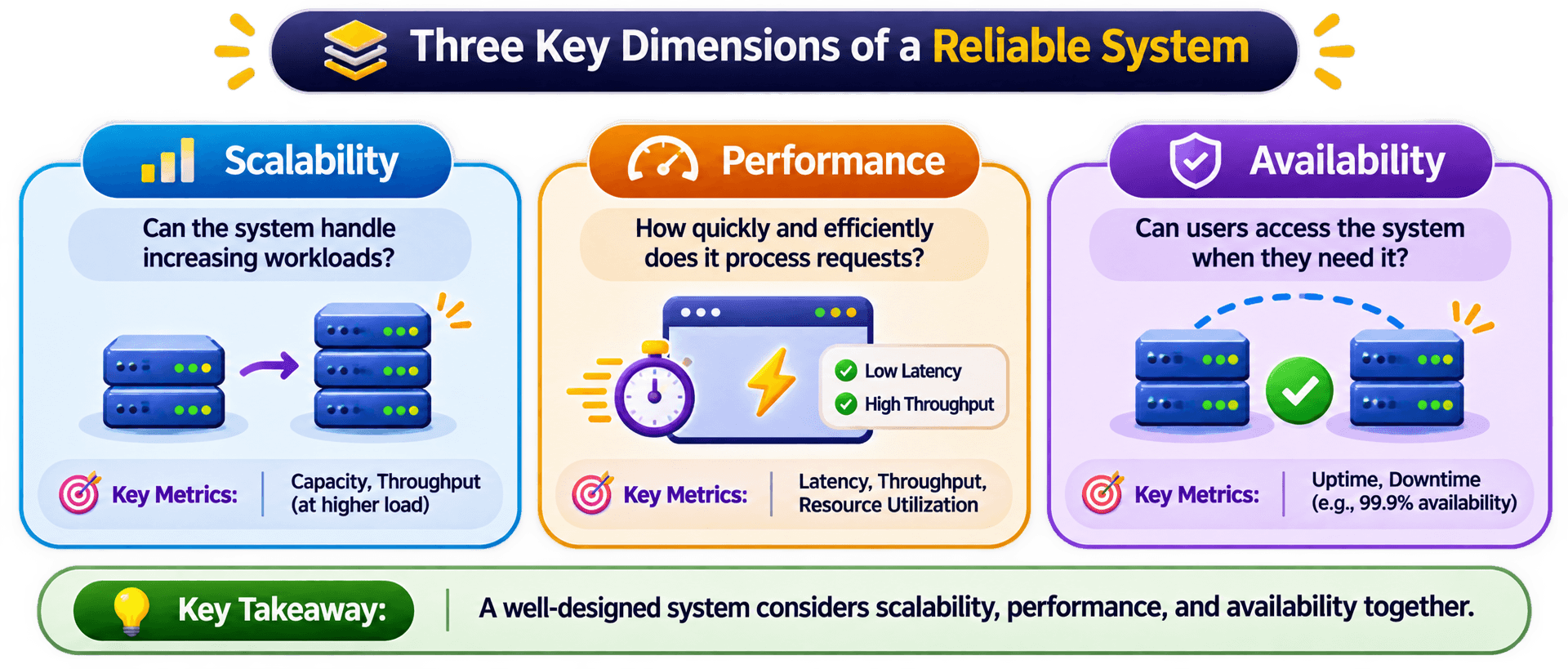
A good system is not just one that handles more users. It should also process requests efficiently and remain accessible when failures occur.
These three properties ( Scalability ,Performance and Availability ) are related, but they solve different engineering problems.
Scalability - Handling Increasing Workload
Scalability is the ability of a system to accommodate increasing workloads by expanding or adjusting its resources while maintaining acceptable service quality.
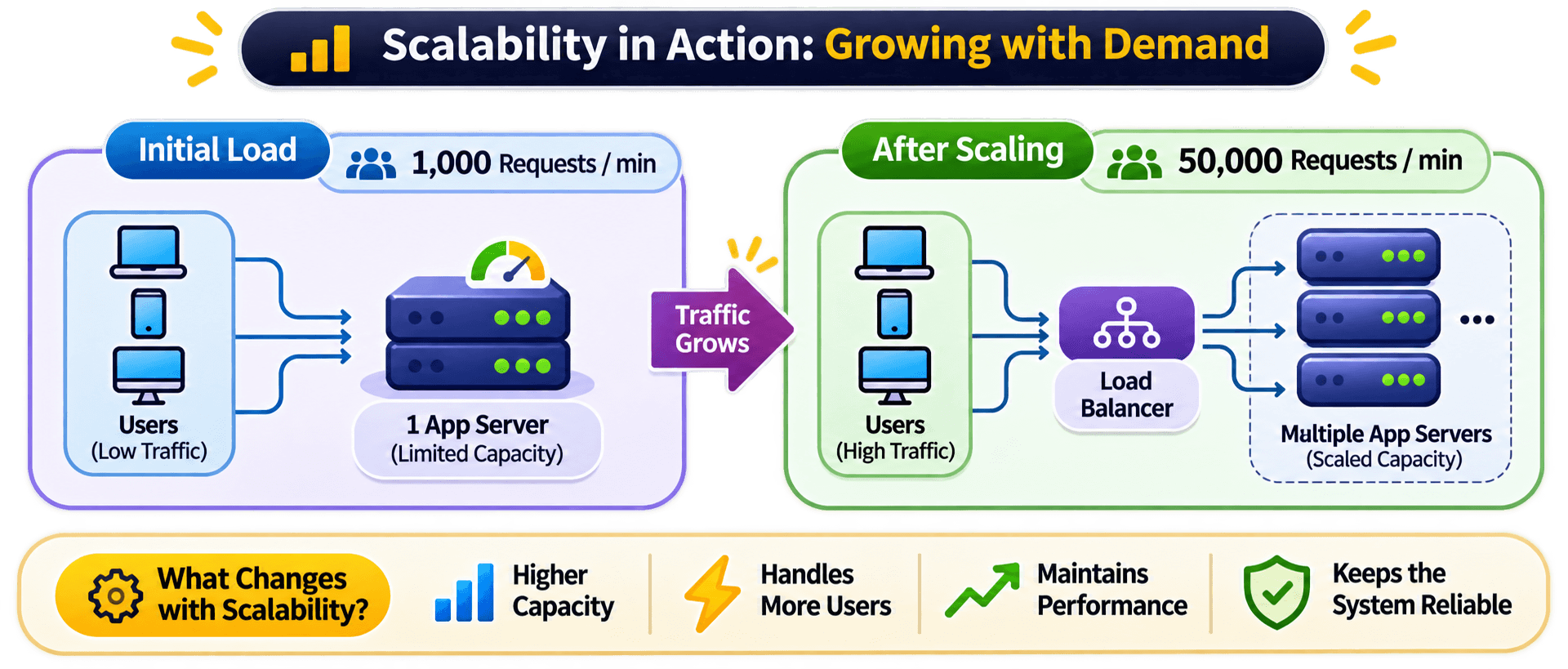
Imagine an e-commerce application that initially receives 1,000 req/min .
As the business grows, it starts receiving 50,000 req/min . The existing infrastructure may no longer have enough capacity to process all incoming requests efficiently.
The system needs to increase its capacity to handle this growing demand.
Two fundamental approaches to scaling:
Increase the resources of an existing server.
- Increase CPU cores.
- Add more RAM.
- Use faster storage.
Idea: Make the existing machine more powerful.Add more machines or application instances to distribute the workload.
- Run multiple application servers.
- Distribute requests using a load balancer.
- Add instances as traffic grows.
Idea:Add more machines to share the workload.Other characteristics of scalability:
- Handles increasing concurrent users and requests.
- Accommodates growing datasets and processing requirements.
- Allows infrastructure capacity to expand.
- Helps prevent workload growth from overwhelming system resources.
Real-world analogy
Performance — Processing Requests Efficiently
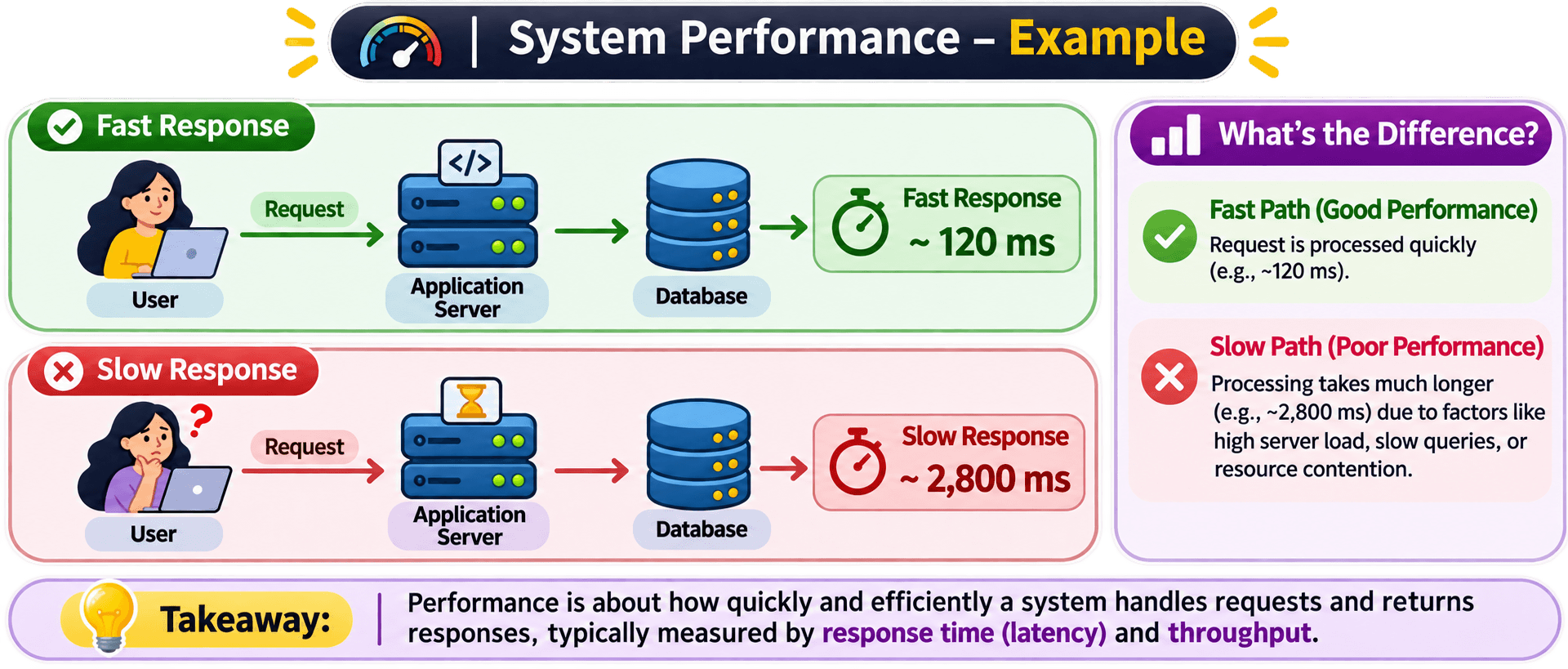
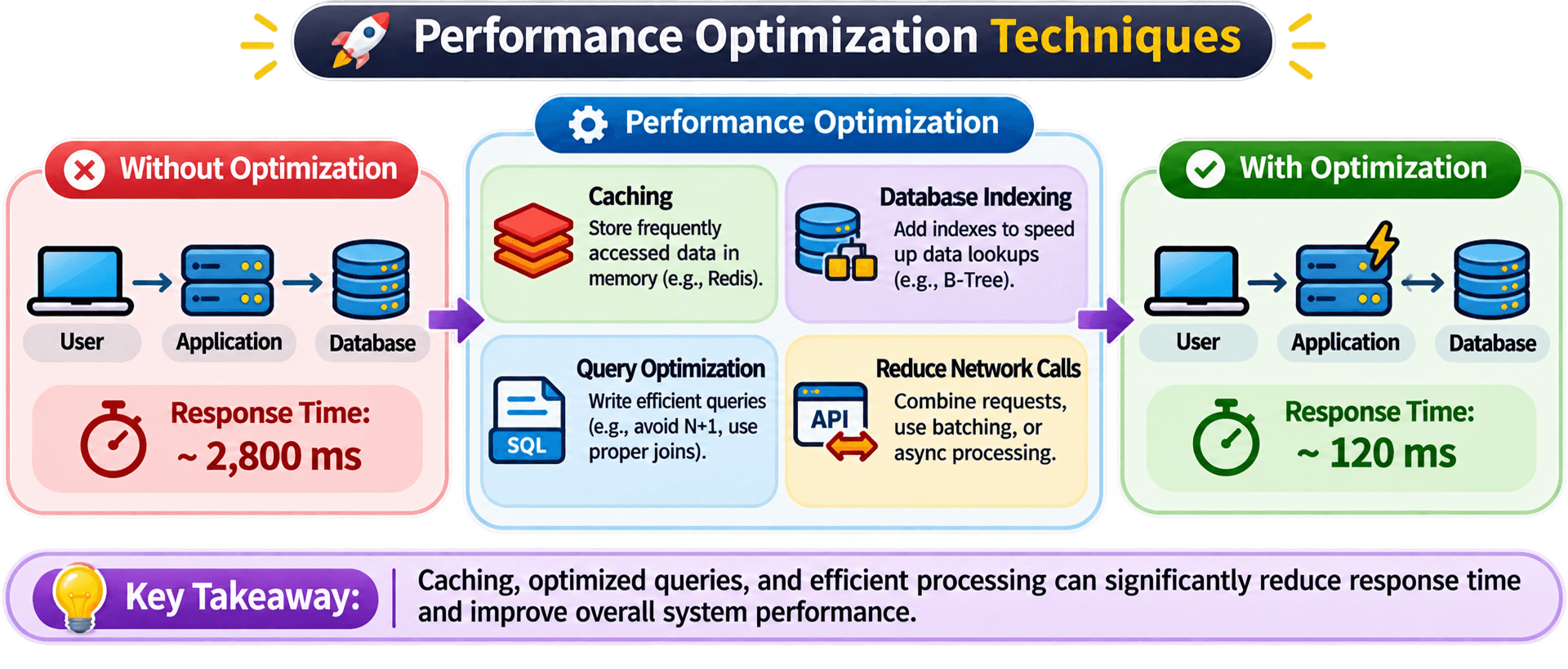
Performance describes how efficiently a system processes requests and delivers results.
It is commonly evaluated through Response Time, Latency, Throughput, and Resource Utilization.
If the application takes 8 seconds to return product details, the user experiences poor performance, even if the application is available and successfully processing requests.
Important performance metrics :
Latency is the time taken for an operation or request to complete, measured from the relevant starting point to its completion.
Example : A product API takes 200 milliseconds to return a response.Lower latency generally means faster responses.
Throughput is the amount of work a system successfully processes within a given period.
Common measurements :
- Requests per second (RPS).
- Transactions per second (TPS).
- Messages processed per second.
Example : An application processes 5,000 requests per second.
Measures how much of the available system resources are being consumed.
Common examples :
- CPU utilization.
- Memory utilization.
- Disk I/O.
- Network bandwidth.
An application server consistently operating at 95% CPU utilization may have limited headroom for additional workload.
How can we improve performance ?
❖ Implement caching to avoid repeated expensive operations.
❖ Optimize database queries and indexing.
❖ Reduce unnecessary network calls.
❖ Use efficient algorithms and data structures.
❖ Optimize application code.
❖ Use asynchronous processing where appropriate.
❖ Reduce payload size and unnecessary data transfer.
Availability — Keeping the System Accessible
Availability is the ability of a system to remain operational and accessible when users or other systems need it.
Imagine an online banking application.
Users depend on it to :
- Check account balances
- Transfer money.
- View transaction history.
- Make payments.
If the application's server crashes and users cannot access these services, the system experiences downtime.
Even if the application was extremely fast before the failure, it provides no value while unavailable.
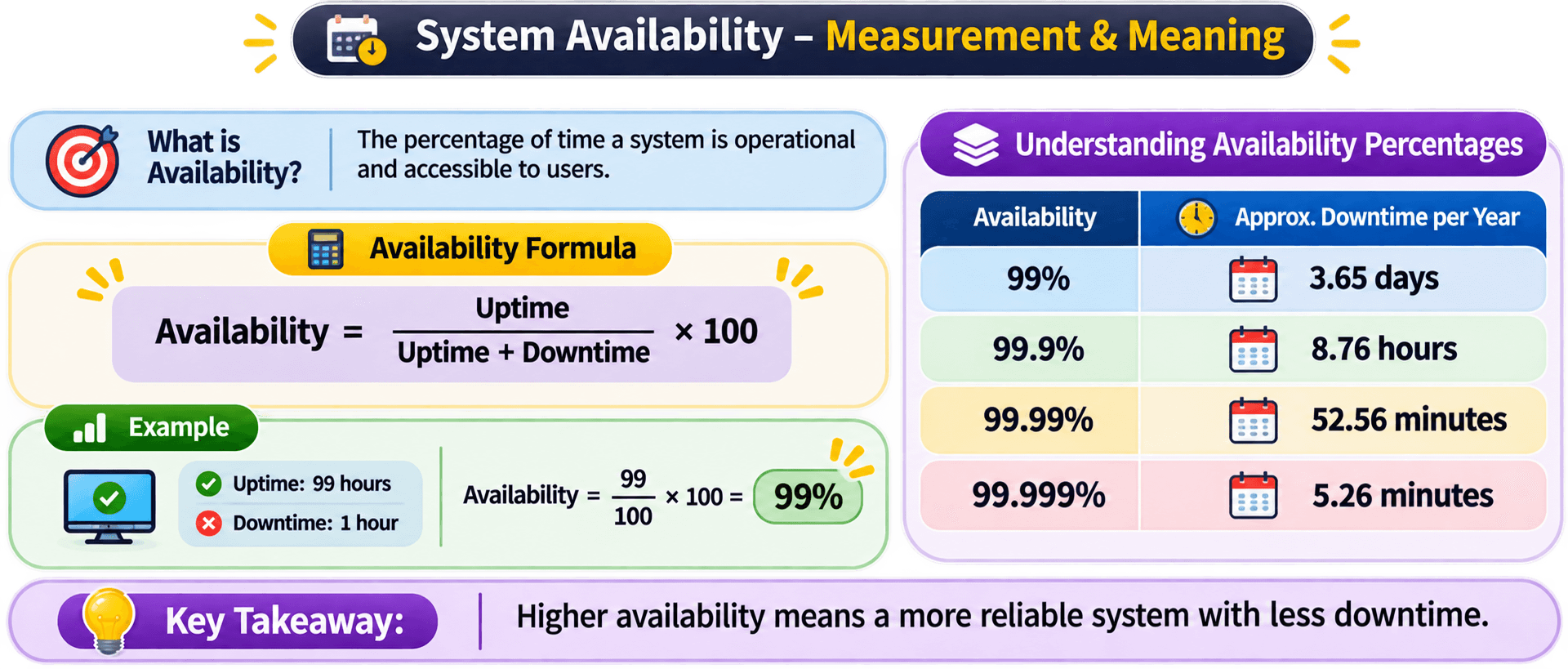
How is availability measured ?
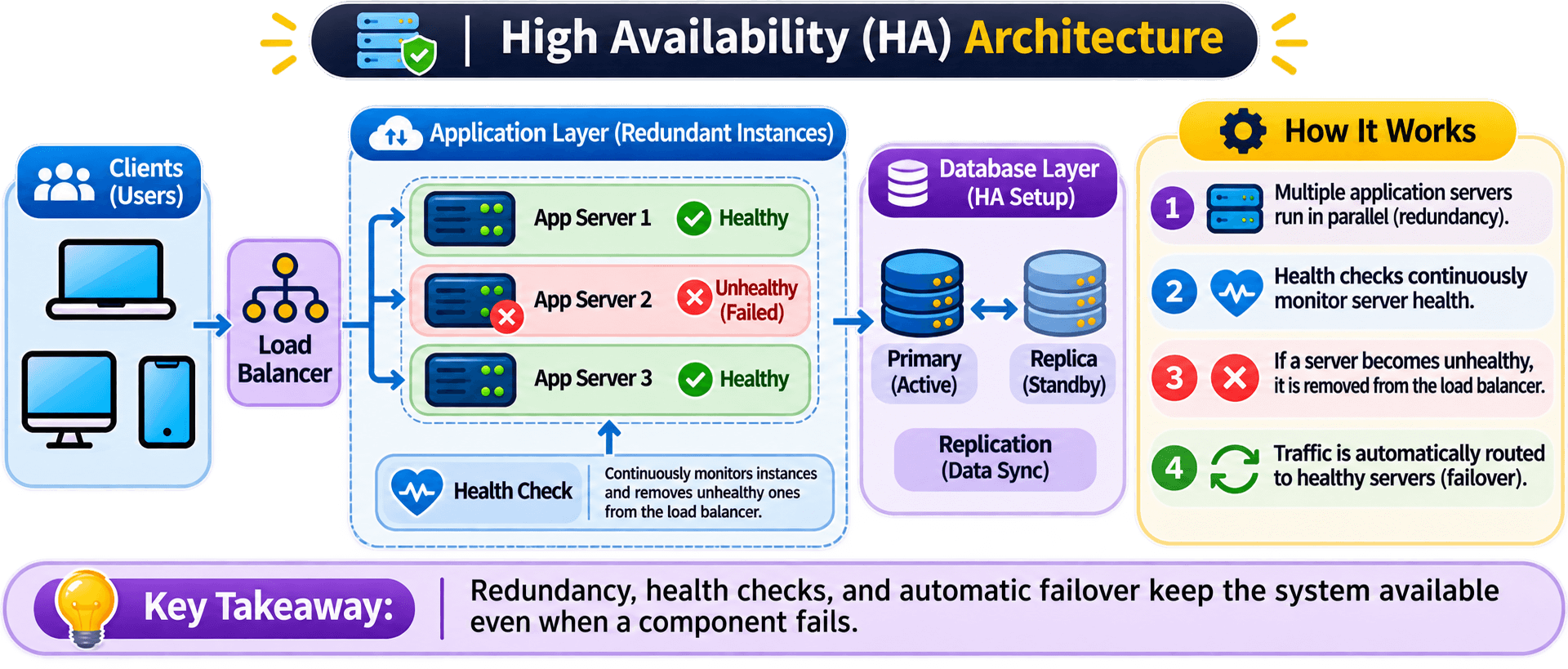
How can we improve availability ?
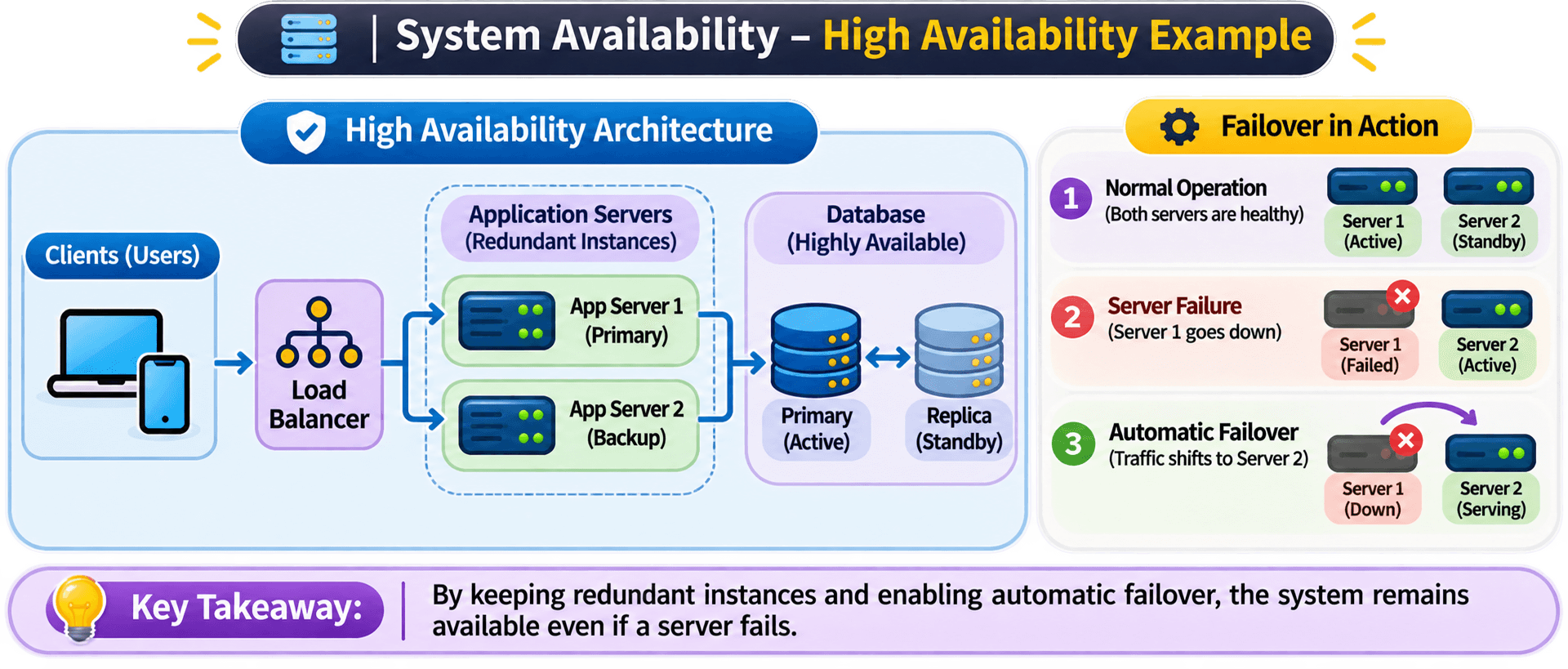
❖ Use multiple application server instances.
❖ Introduce redundancy to avoid single points of failure.
❖ Use health checks to detect unhealthy instances.
❖ Configure automatic failover where appropriate.
❖ Deploy services across multiple availability zones.
❖ Maintain database backups and recovery strategies.
❖ Monitor services and detect failures quickly.
Real-world analogy
Side-by-Side Comparison
These concepts solve different problems, even though they often influence one another.
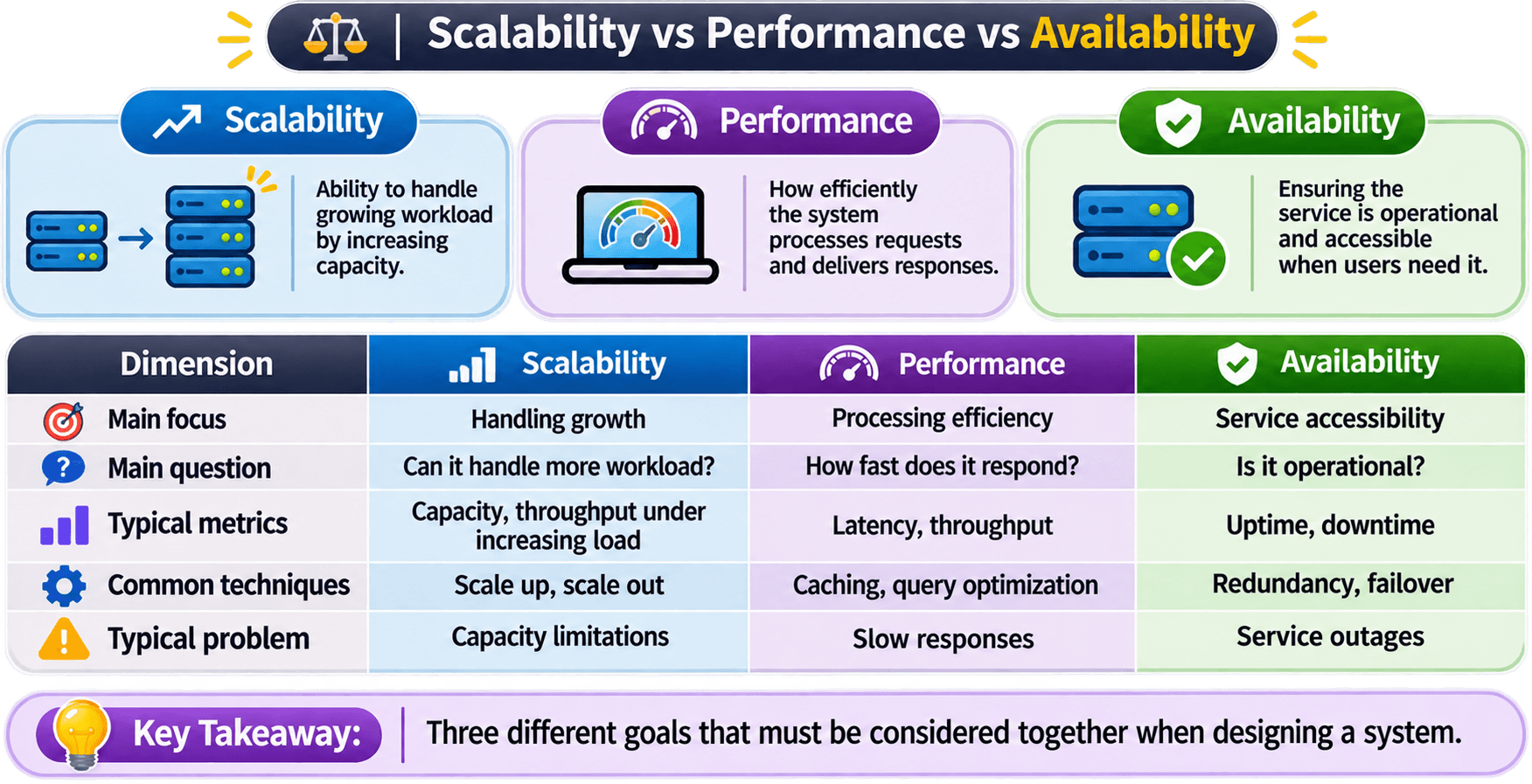
Understand the difference through three scenarios :
An application responds in 100 milliseconds when serving 100 users.
However, when traffic increases to 100,000 users, the single server cannot handle the additional workload.
Result : The application performs well under a small workload but cannot accommodate significant growth.An application has 20 application server instances and can distribute a large volume of incoming requests.
However, every request executes an inefficient database query that takes 5 seconds.
Result : The application can handle more workload, but individual requests remain slow.An application responds in 50 milliseconds under normal conditions.
However, it runs on a single application server without redundancy.
If that server crashes, the application becomes unavailable.
Result : The application is fast when operational, but it cannot reliably remain accessible during failures.Designing a System with All Three Properties
Typography as="h3" className="text-rose-300 font-medium text-[16px]" value="Can a system be scalable, performant, and highly available ?"/>
Yes, A well-designed architecture aims to achieve all three, although engineering trade-offs and constraints always exist.
Consider a growing e-commerce platform.
It needs to handle increasing traffic, return product information quickly, and remain accessible even when individual servers fail.
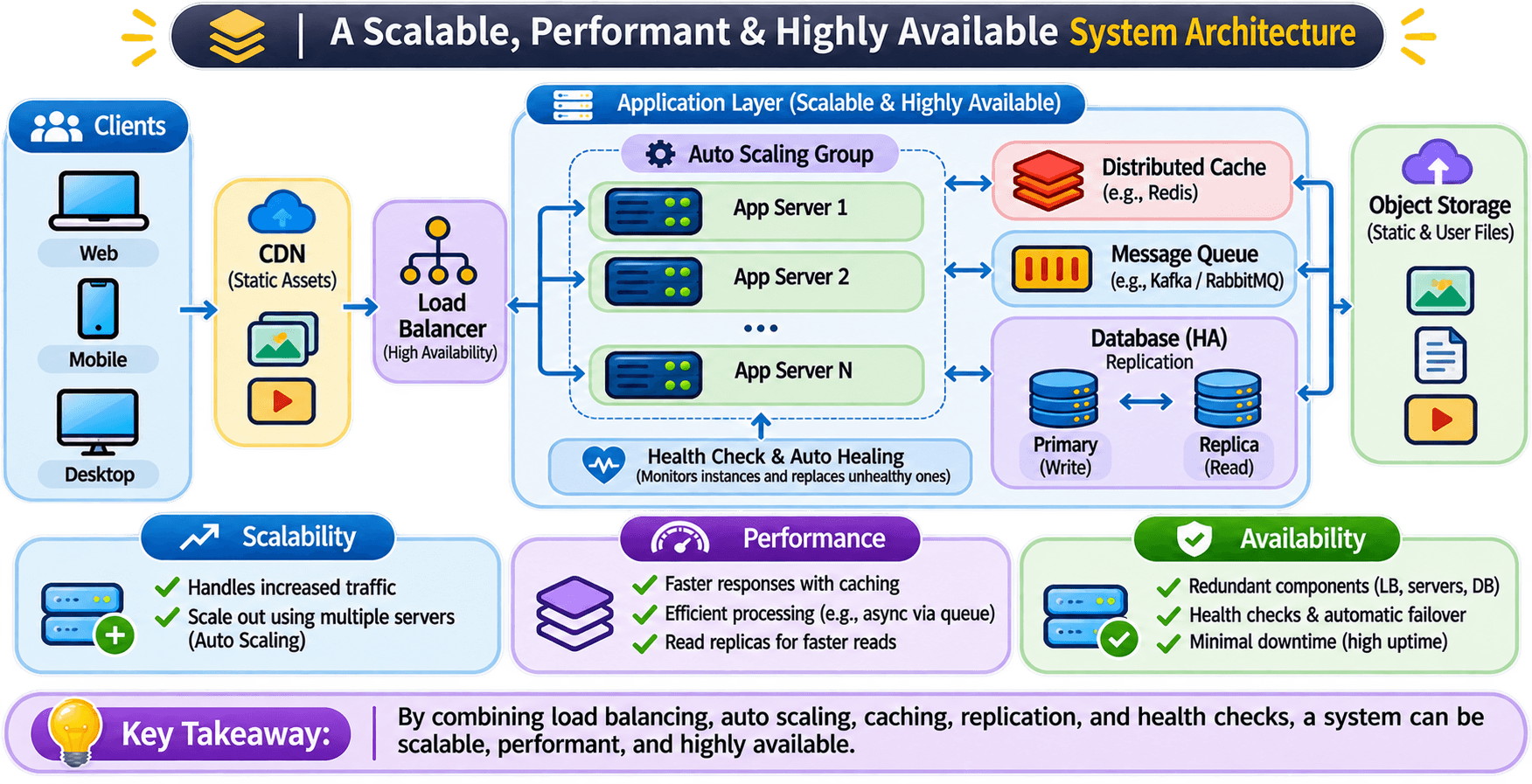
How does this architecture address each dimension ?
Multiple application server instances distribute incoming traffic.
Additional instances can be added as workload increases.
Techniques : Load balancing and horizontal scaling.Frequently accessed product information can be served from a cache.
Database queries can be optimized to reduce processing time.
Techniques : Redis caching, indexing, and query optimization.Multiple application instances provide redundancy.
If one instance fails, the load balancer can stop sending traffic to it and route requests to healthy instances.
Database replication and failover can help reduce database-related downtime.
Techniques : Redundancy, health checks, and failover.Interview Questions